
FLUX 3 vs FLUX 2: 13 Same-Prompt Image Tests (2026)
FLUX 3 vs FLUX 2, tested: 13 real prompts at 1K on FLUX 3 Image and FLUX.2 [max]. Where FLUX 3 wins, where FLUX.2 still wins, and what looks different.
FLUX 3 vs FLUX 2, in short: in 13 same-prompt tests at 1K, FLUX 3 Image won on exact text and a six-reference edit, and kept faces and backgrounds closer to the original. FLUX.2 [max] won four tests on mood, scale and pose. Five ended level. Try your own prompt in the flux-3image generator.
Last updated: October 2, 2026 · about 12 min read
For this FLUX 3 vs FLUX 2 test we took 13 prompts that people actually use, from the prompting guides of Black Forest Labs (BFL), Civitai community images and two public prompt libraries, and ran each one once on FLUX 3 Image and once on FLUX.2 [max], the top FLUX.2 tier. Same prompt, same pixel size, no rerolls. Every image below is the first result each model gave us.
FLUX 3 vs FLUX 2: results at a glance
| # | Test | What it stresses | Result |
|---|---|---|---|
| 1 | Perfume in a courtyard | Glass, materials, lens spec | Draw |
| 2 | Energy drink ad | Hand holding a can, slogan text | FLUX 3 Image |
| 3 | Skatepark outfit | Clothing details, hands, film look | Draw |
| 4 | Neon hair portrait | Light, shadow, film grain | FLUX.2 [max] |
| 5 | Cyber samurai | Action pose, two-handed grip | FLUX.2 [max], narrowly |
| 6 | Retro poster | Exact quote, layout | FLUX 3 Image |
| 7 | Living room in hex colors | Many named objects, exact counts | FLUX.2 [max], narrowly |
| 8 | Pancakes and syrup | Liquid pour, chrome | Draw |
| 9 | Mountain wall | Scale, negative space | FLUX.2 [max] |
| 10 | Travel icon set | Six icons, 3×2 grid, one color | Draw |
| 11 | CNN infographic | Exact labels, arrows | FLUX 3 Image |
| 12 | Chicken house from 6 references | Multi-reference composition | FLUX 3 Image |
| 13 | Dress recolor | Change one thing, keep the rest | Split |
FLUX 3 vs FLUX 2 final count: FLUX 3 Image 4, FLUX.2 [max] 4, draws or splits 5.
Is FLUX 3 better than FLUX 2?
Not across the board, at least in this FLUX 3 vs FLUX 2 test. FLUX 3 Image is the safer pick when the image has to say something exactly, when you combine several references, or when an edit must leave the rest of the photo alone. FLUX.2 [max] still holds its own on cinematic mood and big-scale compositions, and it won as many tests as FLUX 3 did.
The gap is not "new model beats old model everywhere". It is two models with different strengths. FLUX 3 Image reads instructions more literally: quoted text comes out letter-perfect, and every reference image gets a job. FLUX.2 [max] tends to make the more atmospheric photograph, and in two tests it followed the composition part of a long prompt more faithfully.
What BFL says is new in FLUX 3 Image
These are BFL's and fal's own descriptions, as of October 2026, next to how each one held up in our FLUX 3 vs FLUX 2 tests. They are their claims, not ours.
| Claim | Where it is stated | What our tests showed |
|---|---|---|
| Native high resolution, up to 4K | fal model card, BFL model page | Not tested here. All 13 tests ran at 1K on purpose. In a separate check, a 4K request returned a 4096 × 4096 file; we did not judge its quality. |
| Improved text rendering | fal model card | Confirmed in our tests. FLUX 3 got every quoted string right in tests 2, 6 and 11. FLUX.2 [max] dropped an exclamation mark and misspelled "Convolution". |
| Up to 10 references | BFL docs | Partly confirmed. We used six references (FLUX.2 [max] takes up to 8 through the API). FLUX 3 used all six correctly. We did not push it to ten. |
| Edits that leave everything else untouched | BFL model page | Partly confirmed. Face and background stayed closer to the original than with FLUX.2 [max], but FLUX 3 turned sheer lace sleeves opaque, which the prompt asked it to keep. |
| Strong prompt following and composition | BFL model page | Mixed. It won the infographic and the six-reference test, but in test 9 it ignored "tiny" and "vast negative space", and in test 7 it drew three plants instead of two. |
| Bounding-box layout control on a 0–1000 grid | BFL model page | Not verified. We sent plain prompts only. The fal endpoint has no separate box field, so we left layout boxes for a future test. |
| Web and image search before generating ("grounding") | BFL docs | Not verified. It is a BFL API setting; the fal endpoint we used does not expose it. |
For FLUX.2, BFL's FLUX.2 overview lists [max] as its highest-quality tier, with up to 8 references through the API.
How we tested FLUX 3 vs FLUX 2
- Models and endpoints (as of October 2, 2026): FLUX 3 Image on fal (
fal-ai/flux-3-image, andfal-ai/flux-3-image/editfor the two edit tests) versus FLUX.2 [max] on fal (fal-ai/flux-2-maxandfal-ai/flux-2-max/edit). - Size: the 1K tier. We ran FLUX 3 Image first with an aspect ratio picked for the prompt, then asked FLUX.2 [max] for the exact same width and height, for example 912 × 1152 or 1360 × 768.
- Seeds: FLUX 3 Image has no seed field on fal. FLUX.2 [max] used seed 42 every time.
- Other settings: defaults on both sides. Prompt expansion stayed off on FLUX 3 Image, and both used their default safety setting. Output was JPEG on both, converted to WebP for this page with the same settings.
- One run each, no cherry-picking: we kept the first image from each model, including the ones with obvious mistakes.
- Prompts: copied word for word from public sources, credited under each pair. The only change: we removed a ComfyUI LoRA tag from the end of prompt 4, since it does nothing on a hosted API.
- Edit inputs: the reference images for tests 12 and 13 were made beforehand with FLUX1.1 [pro], a third model, so neither contestant edited its own work.
- What we judged: prompt adherence, text accuracy, hands and anatomy, materials and lighting, composition, and for edits, how much of the original survived.
The 13 FLUX 3 vs FLUX 2 tests
1. E-commerce product shot: perfume in a Moroccan courtyard
![Glass perfume bottle labeled Parfum on a sunlit stone ledge with blurred zellige tiles, orange trees and a fountain, made with FLUX.2 [max]](/imgs/blog/flux-3-vs-flux-2/t01-perfume-courtyard-flux-2-max.webp)
Prompt
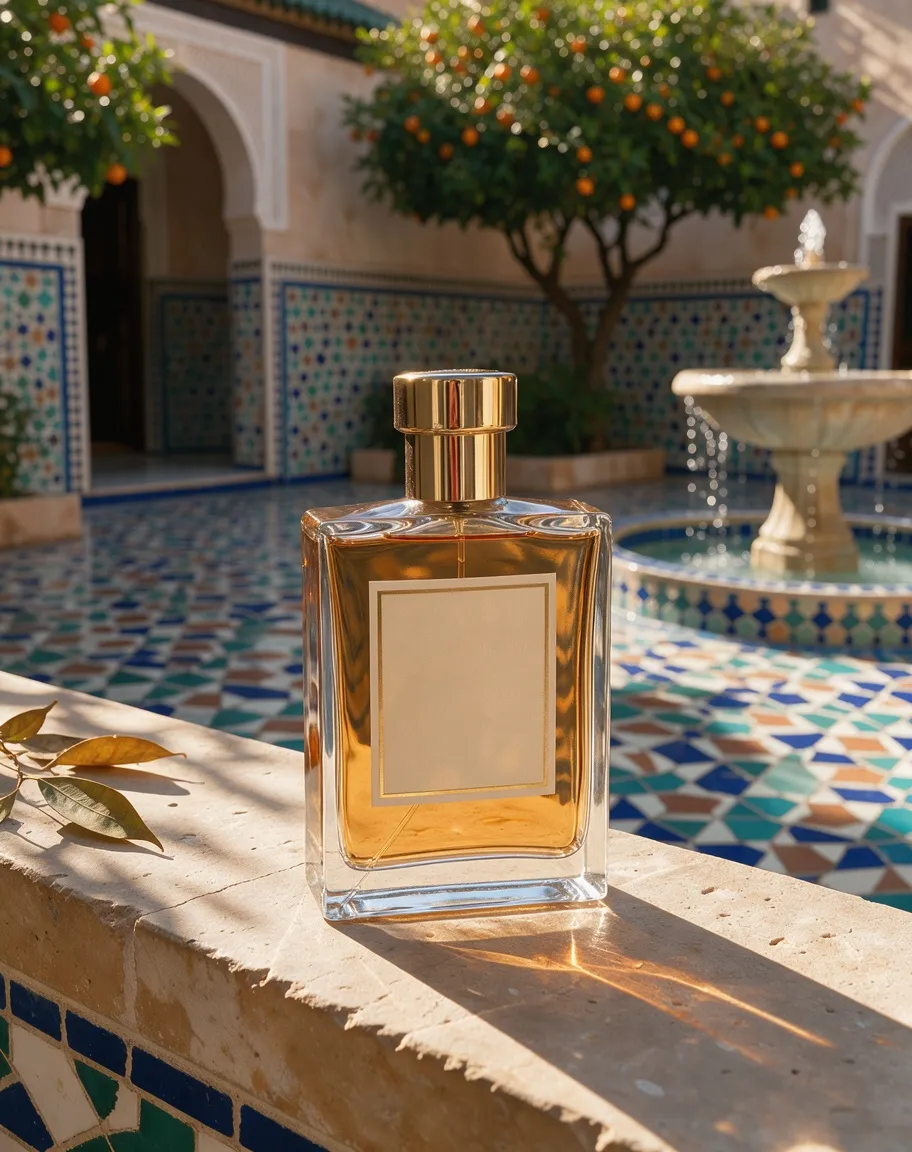
Luxury glass perfume bottle on a sunlit stone ledge in a Moroccan courtyard, intricate zellige tilework in the background, warm golden hour light casting long shadows, soft bokeh of orange trees and a fountain, editorial product photography, shot on Hasselblad X2D, 90mm lens, f/2.8
Source: Black Forest Labs docs, FLUX.2 Product Mockups guide
Both nailed the brief: a glass bottle on a sunlit stone ledge, tilework, orange trees, a fountain and long golden shadows. FLUX 3 Image shows more of the courtyard, with a crisp arched gallery and a tiered fountain. FLUX.2 [max] looks more like a real f/2.8 shot, with a softer background and bright caustics on the stone, and it printed "Parfum" on the label without being asked.
Verdict: draw. FLUX 3 for a fuller scene; FLUX.2 [max] for the shallow-focus lens look.
2. Product on a model: energy drink ad with slogan
![Smiling bearded man holding a silver BUZZ energy drink can, lightning streaks around his flexed arm, slogan text below, made with FLUX.2 [max]](/imgs/blog/flux-3-vs-flux-2/t02-energy-drink-ad-flux-2-max.webp)
Prompt
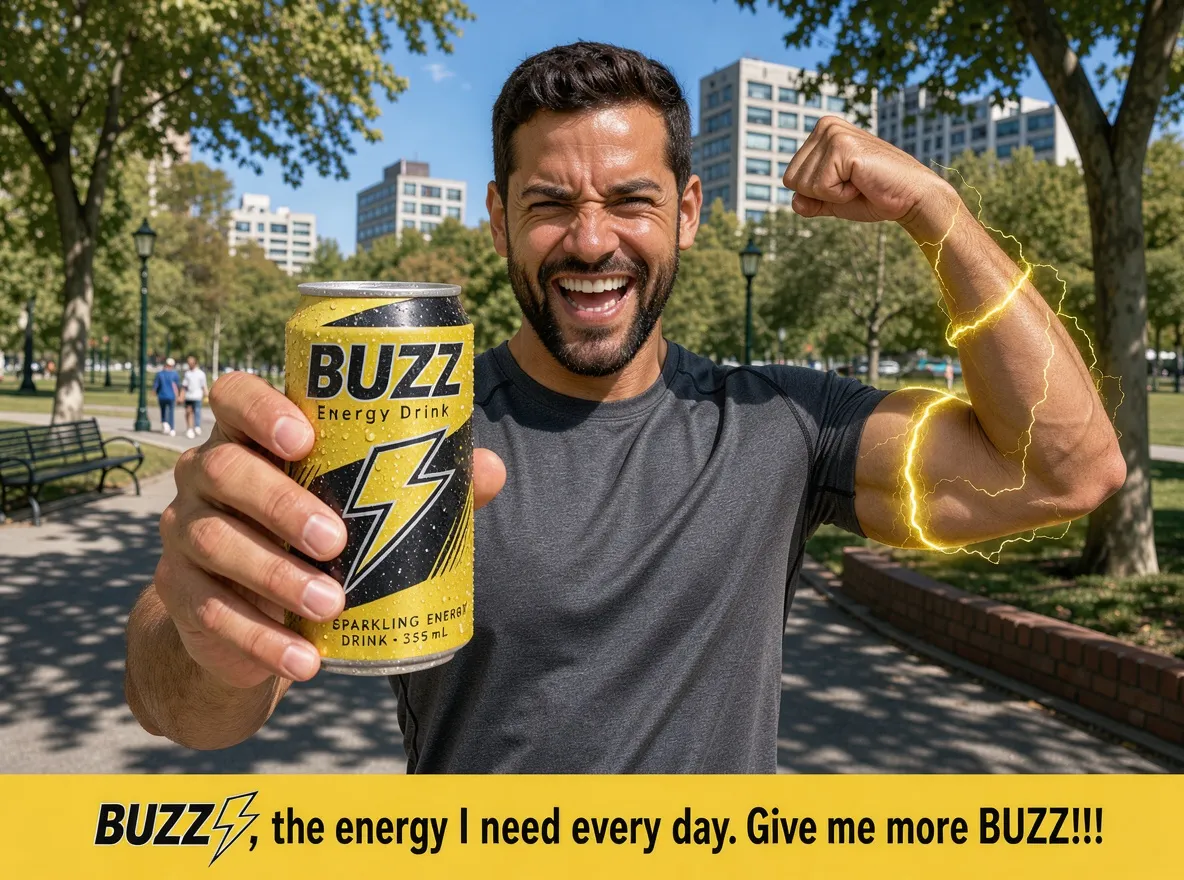
A happy, smiling man with a beard is holding a can of "BUZZ Energy Drink" in his hand, showing it to the camera. The can also has a yellow lightning bolt logo shaped like an "S." Below the can, in small print, it reads: The man is in a natural urban setting, resembling a park on a bright, sunny day. He is flexing his other arm, flexing his other arm, and a yellow energy beam with incandescent lightning bolts appears on his bicep and the rest of his arm. Below the image is text with a slogan, like something from an advertisement: "BUZZ, the energy I need every day. Give me more BUZZ!!!"
This messy real-world prompt asks for a can label, a lightning effect on the flexed arm and a slogan under the image. FLUX 3 Image wrote the slogan exactly, all three exclamation marks included, and added readable small print on the can. FLUX.2 [max] wrote "BUZZ!!" with two, and its small print turns into near-words. Its lightning effect on the arm is the more dramatic of the two. The hands holding the can look natural in both.
Verdict: FLUX 3 Image, for text that is right down to the punctuation.
3. Apparel on a person: skatepark outfit
![Man in a faded navy graphic tee and khaki work pants crouching over a skateboard on a ramp at golden hour, made with FLUX.2 [max]](/imgs/blog/flux-3-vs-flux-2/t03-skatepark-outfit-flux-2-max.webp)
Prompt
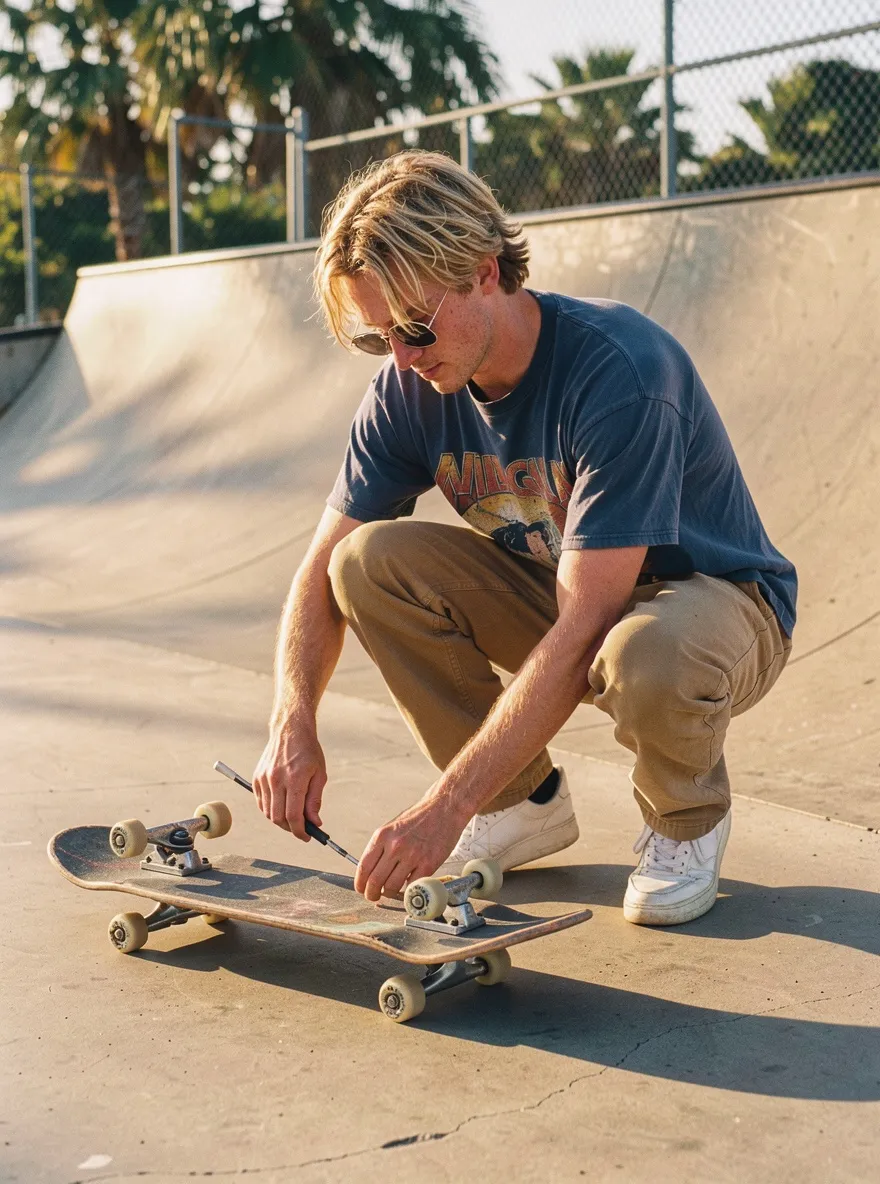
A 22-year-old man with a lean, athletic build crouches to adjust the wheels of his skateboard on a sun-drenched concrete skatepark ramp. He has shaggy, sun-bleached hair falling over wire-rimmed sunglasses and a light dusting of freckles across his nose. He is wearing a faded navy blue graphic t-shirt featuring a retro band logo, loose-fitting khaki work pants with a slight flare at the bottom, and pristine white leather sneakers with a chunky silhouette. The scene is bathed in dramatic golden hour sunlight, casting long, sharp shadows across the concrete and highlighting the texture of his clothing. The background is a blurred expanse of palm trees and a chain-link fence, bathed in a warm, nostalgic glow. The image should have a film grain aesthetic, resembling a shot taken on Kodak Portra 400 stock with a 35mm lens, capturing a candid, high-fidelity moment of youth culture.
The outfit details came through on both: faded navy graphic tee, flared khaki work pants, chunky white sneakers, wire-rimmed sunglasses. FLUX 3 Image gets the action right, with a skate tool in one hand adjusting a wheel, but the board has trucks on both sides. FLUX.2 [max] has the stronger golden-hour film look and the blurred palm-tree background the prompt asks for, but its board is oddly short and the wheels are muddled.
Verdict: draw. Both made one clear mistake with the skateboard.
4. Stylized portrait: neon hair and film grain
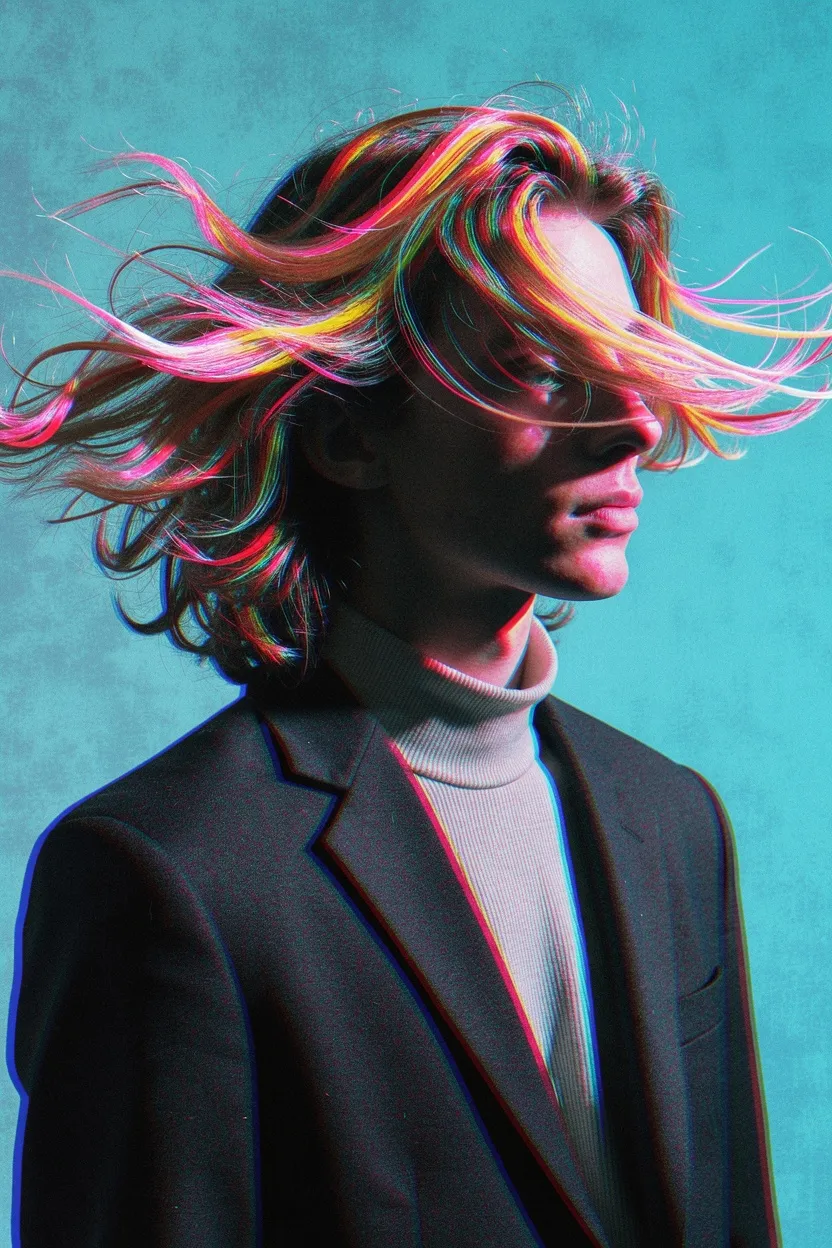
![Profile portrait with the face in deep shadow and glowing pink and yellow hair swirling like liquid light on a cyan backdrop, made with FLUX.2 [max]](/imgs/blog/flux-3-vs-flux-2/t04-neon-hair-portrait-flux-2-max.webp)
Prompt
Slightly low angle features an androgynous person's shown in 3/4 profile, against a grainy cyan background. The subject wears a dark blazer over a light, ribbed turtleneck. The face is mostly in deep shadow, with faint pink light catching the profile of the nose and lips. The upper head is enveloped in long, swirling hair that glows with vibrant neon pink, yellow, and cyan streaks, resembling flowing liquid light. This luminous hair partially veils the face. Intense chromatic aberration is visible on the texture of the turtleneck and the edges of the dark clothing. The lighting is high-contrast, juxtaposing the dark silhouette with the radiant, multicolored hair. The image has a heavy film grain texture throughout, creating a surreal and futuristic aesthetic.
Source: Civitai community image (FLUX.2 [dev]), user NowhereManGo
The prompt wants the face "mostly in deep shadow" with faint pink light catching the nose and lips. FLUX.2 [max] does exactly that, and its hair really looks like "flowing liquid light". The turtleneck's ribbing is clearly visible too. One flaw: a thin pink line runs along the jaw like a drawn outline. FLUX 3 Image lights the face much more and pushes the chromatic aberration harder along the blazer, but the hair reads as dyed streaks rather than light.
Verdict: FLUX.2 [max], for following the lighting brief.
5. Illustration and game art: cyber samurai with a two-handed grip
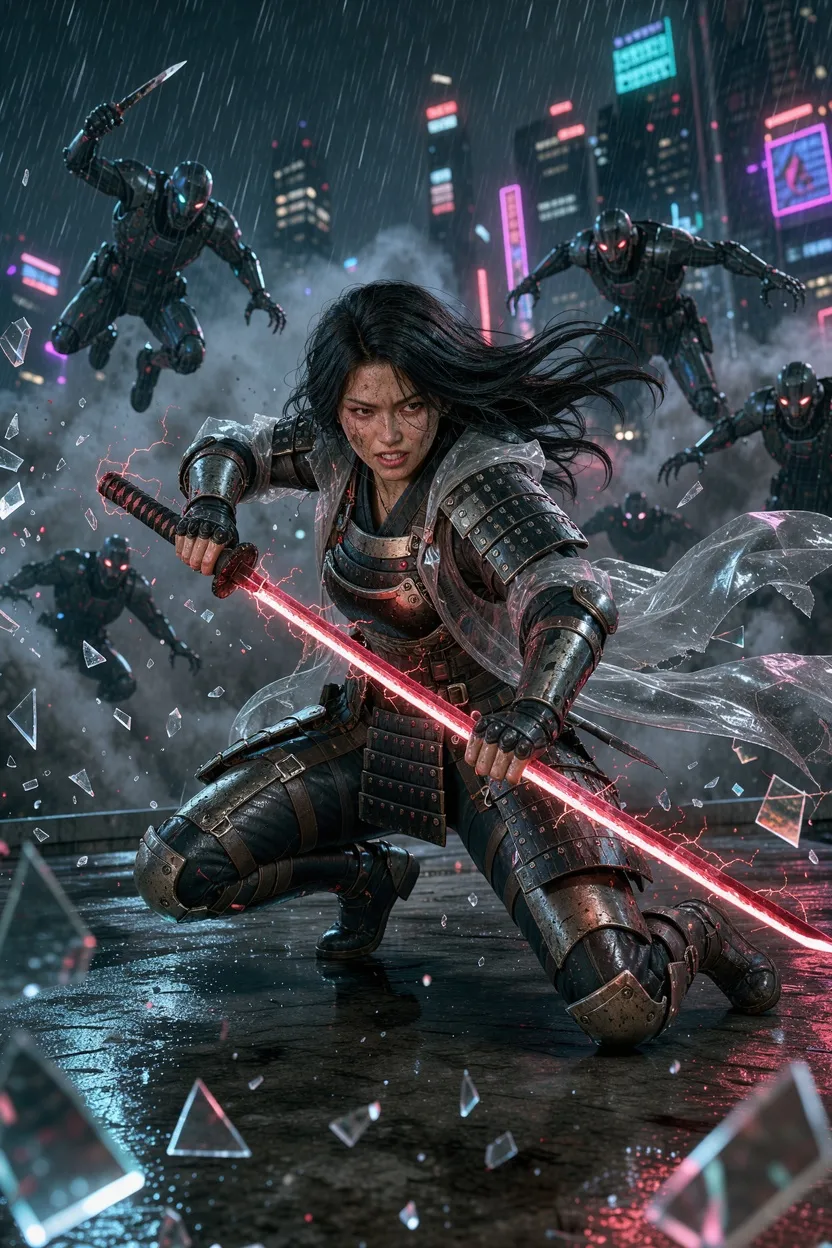
![Armored cyberpunk samurai woman holding a red energy katana with both hands on a rainy rooftop, cyborgs closing in, made with FLUX.2 [max]](/imgs/blog/flux-3-vs-flux-2/t05-cyber-samurai-flux-2-max.webp)
Prompt
A dynamic 3D game cinematics still render from a low angle, capturing a powerful female cyberpunk samurai crouching low on a rain-slicked rooftop in a desperate battle. She is holding a crackling red energy katana with a precise, firm two-handed grip: her right hand grasps the handle immediately below the guard, while her left hand firmly holds the pommel at the bottom, angling the blade diagonally across her body in a defensive stance. She has a fierce, defiant expression and long, wild black hair whipping in the wind. Her armor is a detailed fusion of battered traditional samurai plates and dark tactical gear, overlaid with a torn, transparent vinyl trench coat that billows violently. Multiple glowing-eyed cyborg enemies are lunging from the shadows. The air is filled with heavy rain, smoke, and shattered glass. The background is a blurry neon cityscape. Intense, high-contrast lighting emphasizes the wet textures of metal, leather, and skin.
Source: Civitai community image (FLUX.2 [dev]), user AlexiosAleximus
This prompt is hard on purpose: a low crouch, a precise two-handed grip, a transparent coat, rain, smoke, broken glass and several enemies. FLUX 3 Image builds the busier, more convincing battle: deeper crouch, more cyborgs lunging, flying glass. But one of her hands wraps around the glowing blade instead of the handle. FLUX.2 [max] puts both hands on the handle, closer to the brief, though the hilt grows a second guard near the pommel. Its billboards also show fake lettering.
Verdict: FLUX.2 [max], narrowly. The grip was the hardest instruction, and it got closer.
6. Poster typography: groovy retro quote
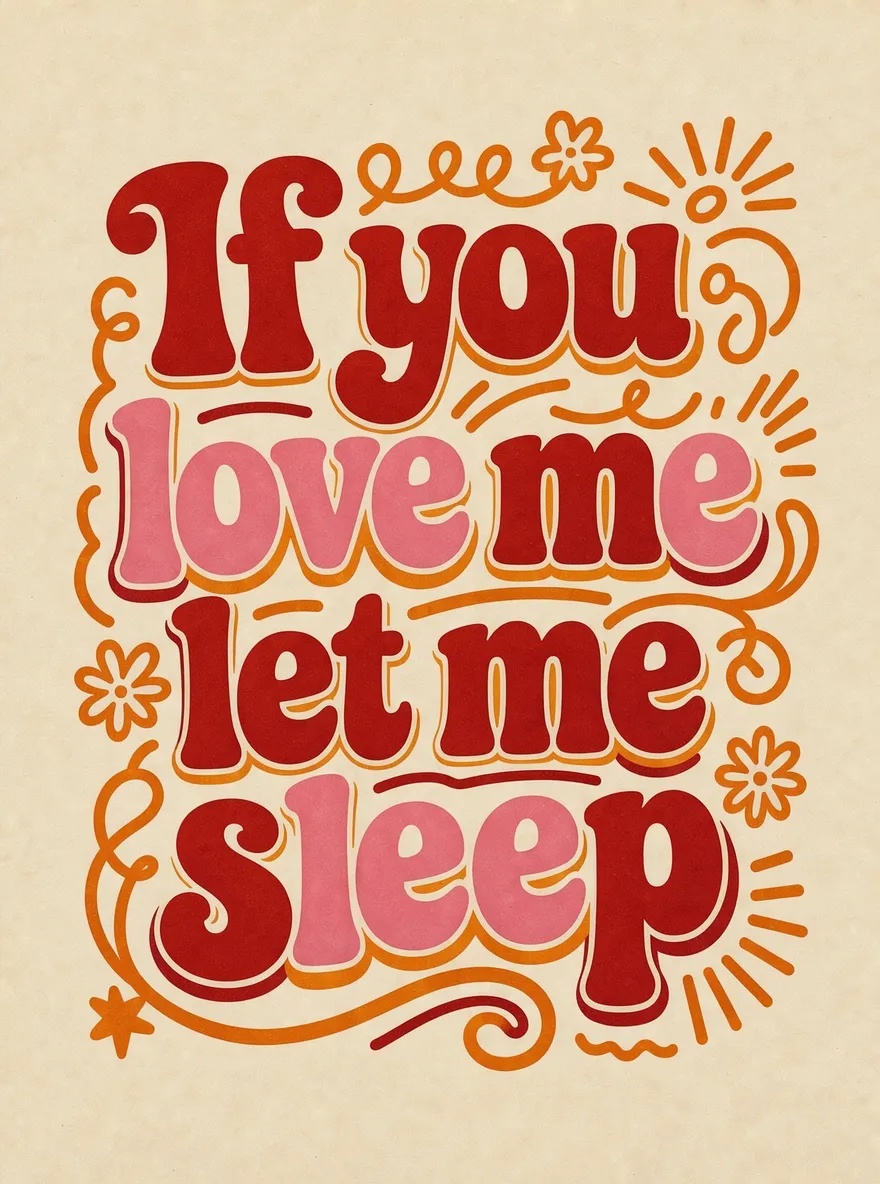
![Retro poster reading If you love me let me sleep in muted red and pink lettering inside an orange swirl frame, made with FLUX.2 [max]](/imgs/blog/flux-3-vs-flux-2/t06-retro-poster-flux-2-max.webp)
Prompt
Groovy retro poster with the quote "If you love me let me sleep". Bold 70s typography in deep red and warm pink tones. Cream background and bold orange doodle around the text. Funky layout with playful shadow. Style: bold vintage aesthetic, dopamine decor
Source: Black Forest Labs docs, FLUX.2 Prompting Guide (Typography and Design)
Both spelled "If you love me let me sleep" correctly. FLUX 3 Image follows the color brief closely, deep red and warm pink letters on cream with orange doodles around the words, and it looks like a finished print. FLUX.2 [max] boxes the text in an orange frame, mutes the reds, and places a stray opening quote mark under the last line.
Verdict: FLUX 3 Image, for cleaner layout and closer color match.
7. Interior: living room with hex colors
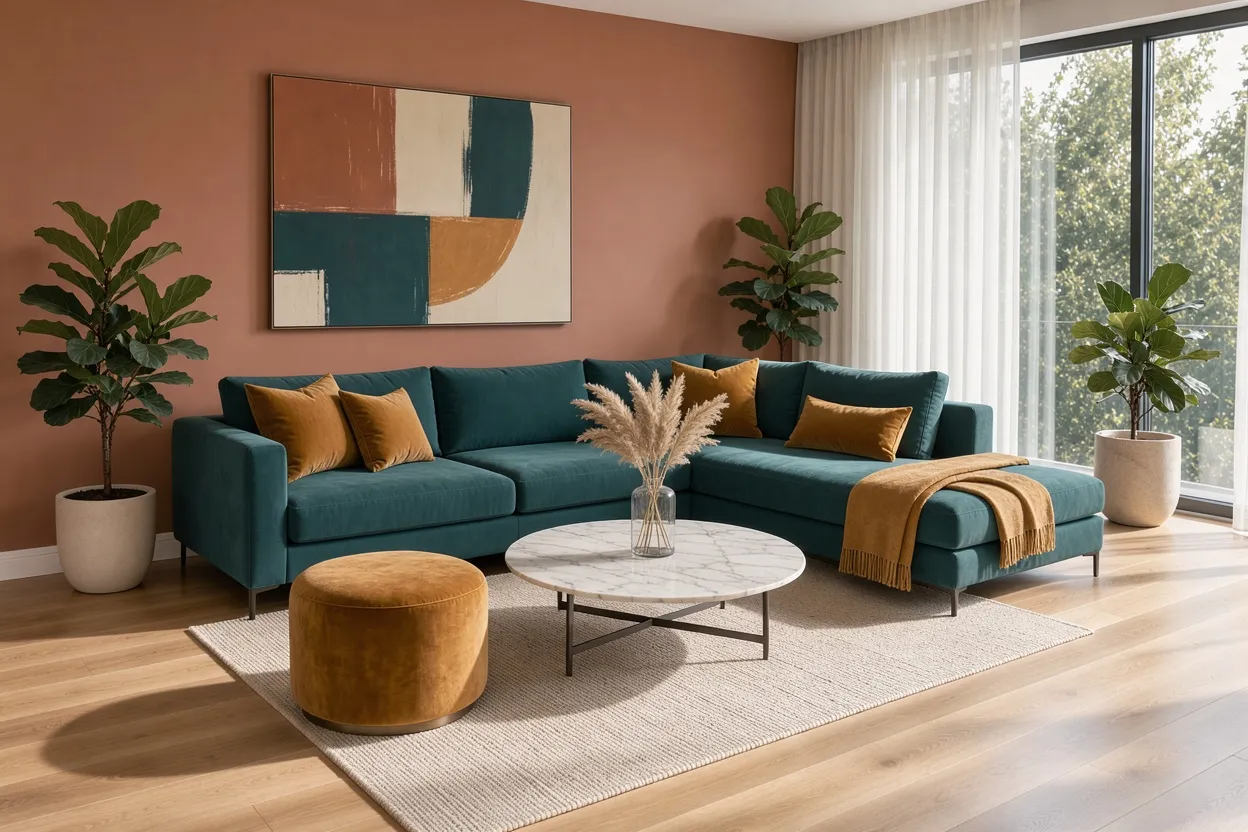
![Living room with terracotta walls, teal sectional, mustard ottoman, marble table, two fiddle leaf figs and sheer curtains, made with FLUX.2 [max]](/imgs/blog/flux-3-vs-flux-2/t07-living-room-hex-flux-2-max.webp)
Prompt
A modern living room with warm terracotta walls in hex #C4725A, a large L-shaped sectional sofa in deep teal hex #1B6B6F, and golden amber hex #E8A847 accent pillows, throw blanket, and a velvet ottoman. Light oak hardwood floors, a round marble coffee table with dried pampas grass in a glass vase, floor-to-ceiling windows with sheer white curtains letting in soft afternoon light, two potted fiddle leaf figs, and an abstract painting on the main wall featuring all three accent colors. Clean minimal composition, natural daylight casting soft shadows across the room.
Source: Black Forest Labs docs, FLUX.2 Prompting Guide (HEX color prompting)
This prompt lists about a dozen items and three hex colors. Both rooms have the terracotta walls, teal L-shaped sectional, amber pillows, throw, velvet ottoman, round marble table, pampas grass in a glass vase, sheer curtains and a painting that uses all three accents. Judged by eye, both color sets look close to the hex values. The difference is counting: the prompt says two fiddle leaf figs; FLUX 3 Image painted three, FLUX.2 [max] painted two. FLUX 3 shows the floor-to-ceiling window more clearly.
Verdict: FLUX.2 [max], narrowly, for the exact count.
8. Food: pancakes with a syrup pour
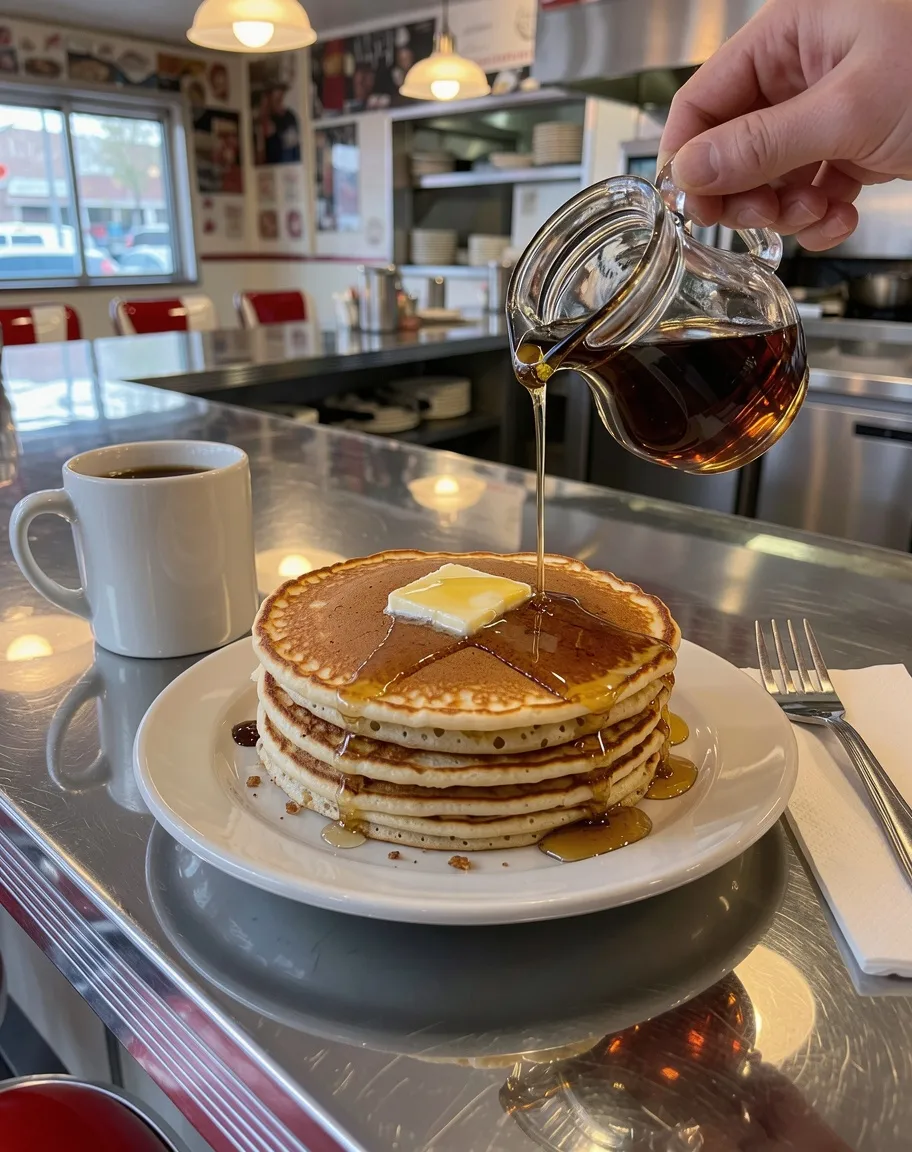
![Thick syrup pouring from a glass dispenser onto steaming pancakes with butter on a chrome counter, made with FLUX.2 [max]](/imgs/blog/flux-3-vs-flux-2/t08-pancake-syrup-flux-2-max.webp)
Prompt: Diner breakfast: pancakes with melting butter, syrup pour action shot, chrome diner counter (fluxnote food photography prompt library)
A short prompt, but liquid and chrome are easy to get wrong. FLUX 3 Image tells the whole diner story: counter, coffee mug, fork and napkin, with a thin, believable syrup stream. FLUX.2 [max] goes for the ad shot: a thicker pour from a glass dispenser, steam, butter melting under the syrup, and a shallow depth of field.
Verdict: draw. FLUX 3 for setting, FLUX.2 [max] for the action close-up.
9. Cinematic landscape: a tiny figure below a vast rock wall
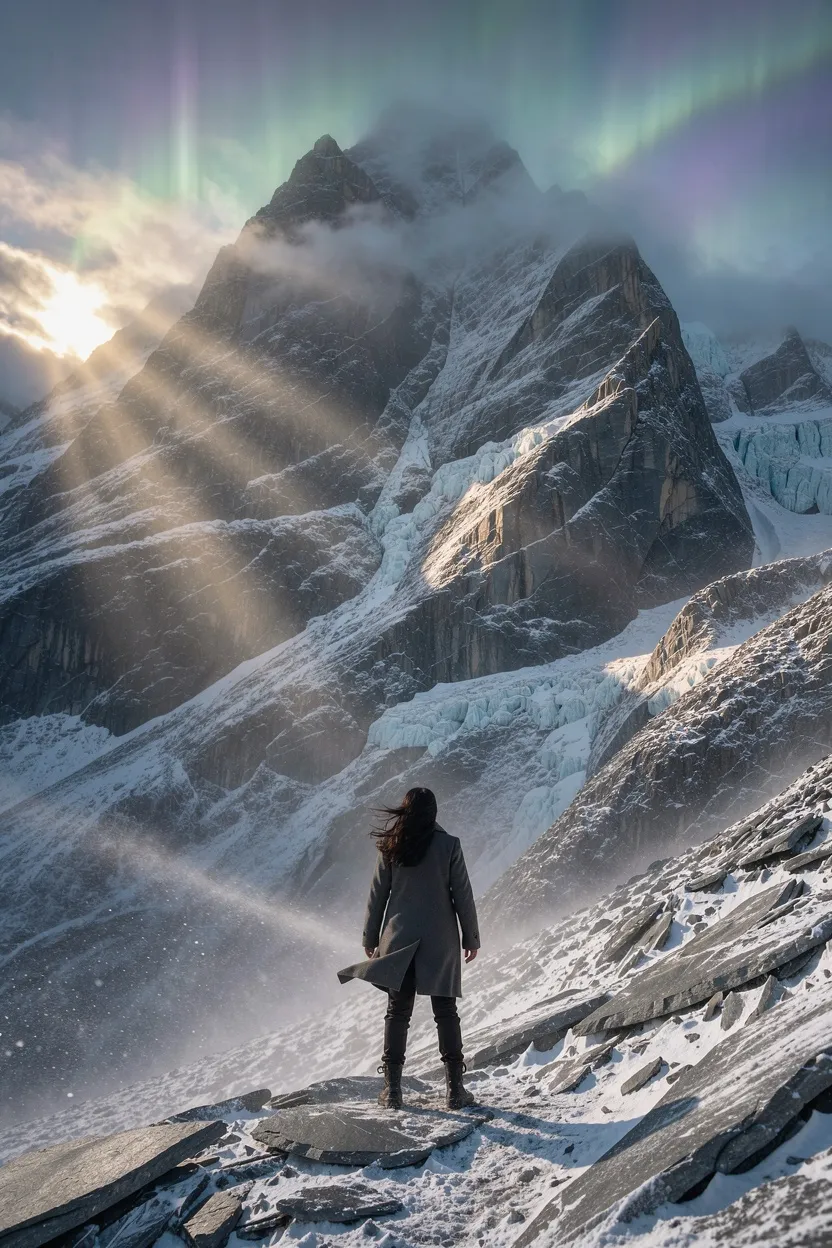
![Tiny figure in a long coat at the base of a sheer rock wall rising into fog and aurora, made with FLUX.2 [max]](/imgs/blog/flux-3-vs-flux-2/t09-mountain-cinematic-flux-2-max.webp)
Prompt
A lone woman stands at the base of an infinitely tall mountain, she is tiny against the colossal vertical wall of rock, wide cinematic shot from behind and slightly below, the mountain rises beyond the frame into clouds and faint aurora like mist, sacred silent atmosphere, wind moves her coat and hair, ancient stone and ice textures with towering cliffs and deep crevasses, soft sunrise light breaks through high fog and creates god rays, warm gold highlights on cold slate rock, long shadows and dramatic scale, subtle floating dust and drifting snow, centered composition with vast negative space, spiritual monumental epic mood, photoreal cinematic still, 24mm lens look, high resolution, crisp detail, atmospheric depth.
Source: Civitai community image (FLUX.2 [dev]), user martinffm
The key words are "tiny", "colossal vertical wall", "centered composition" and "vast negative space". FLUX.2 [max] delivers exactly that: a small figure centered at the foot of a sheer wall that disappears into fog and aurora. FLUX 3 Image paints dramatic god rays and rich ice texture, but the woman is large in the foreground on a snowy slope and the mountain is a normal peak.
Verdict: FLUX.2 [max], clearly. This was FLUX 3's weakest result for composition.
10. Flat vector design: travel icon set

![Six teal thin-line icons in a 3 by 2 grid: airplane, suitcase, map pin, passport, camera and sun, made with FLUX.2 [max]](/imgs/blog/flux-3-vs-flux-2/t10-travel-icons-flux-2-max.webp)
Prompt: Set of six flat line icons for a travel app: airplane, suitcase, map pin, passport, camera, sun. Uniform 2px stroke, single accent color, arranged in a 3x2 grid on white. (IMG.LY AI Benchmarks, prompt l01 Icon Set)
Six icons, a 3×2 grid, one accent color, an even stroke. Both delivered all six in the right order and grid. FLUX 3 Image uses a bolder blue line that reads well at small sizes; FLUX.2 [max] uses a thinner teal line closer to a literal 2px stroke. No missing or extra icons on either side.
Verdict: draw.
11. Infographic: labeled CNN diagram
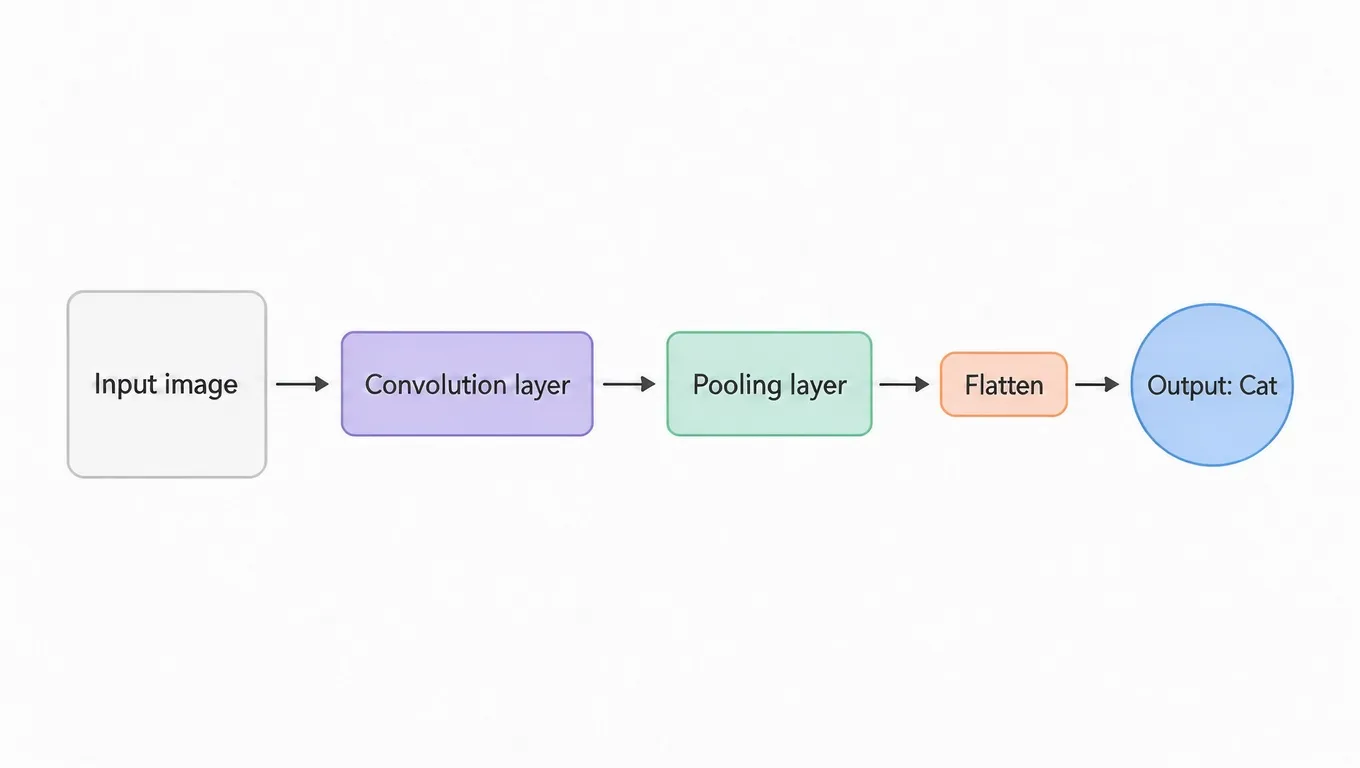
![Flow diagram with boxes labeled Input image, Convoluction layer, Pooling layer, Flatten and Output: Cat, made with FLUX.2 [max]](/imgs/blog/flux-3-vs-flux-2/t11-cnn-infographic-flux-2-max.webp)
Prompt
Minimal vector style infographic of a CNN neural network, white background, centered horizontal layout, very clean and sleek, on the far left a rounded square placeholder with a soft grey border and inside the text 'Input image', to its right a simple arrow pointing to a rounded rectangle with soft pastel fill and the text 'Convolution layer', then another arrow pointing to a rounded rectangle with the text 'Pooling layer', then a thin arrow leading to a horizontal rounded pill shape with the text 'Flatten', then an arrow leading to a single circle on the right with the text 'Output: Cat'
FLUX 3 Image got all five labels right, in the right shapes and order, with clear arrows. FLUX.2 [max] made the "Flatten" step a proper horizontal pill, which FLUX 3 drew as a small rectangle, but it misspelled the second label as "Convoluction layer". In a diagram, one typo means a redo.
Verdict: FLUX 3 Image.
12. Multi-reference edit: a chicken house from six images
Both models got the same six inputs: an illustration of three chickens, then wicker, knitted wool, terracotta tiles, weathered oak and speckled eggs.

The six reference images, in order (made with FLUX1.1 [pro] before the test).
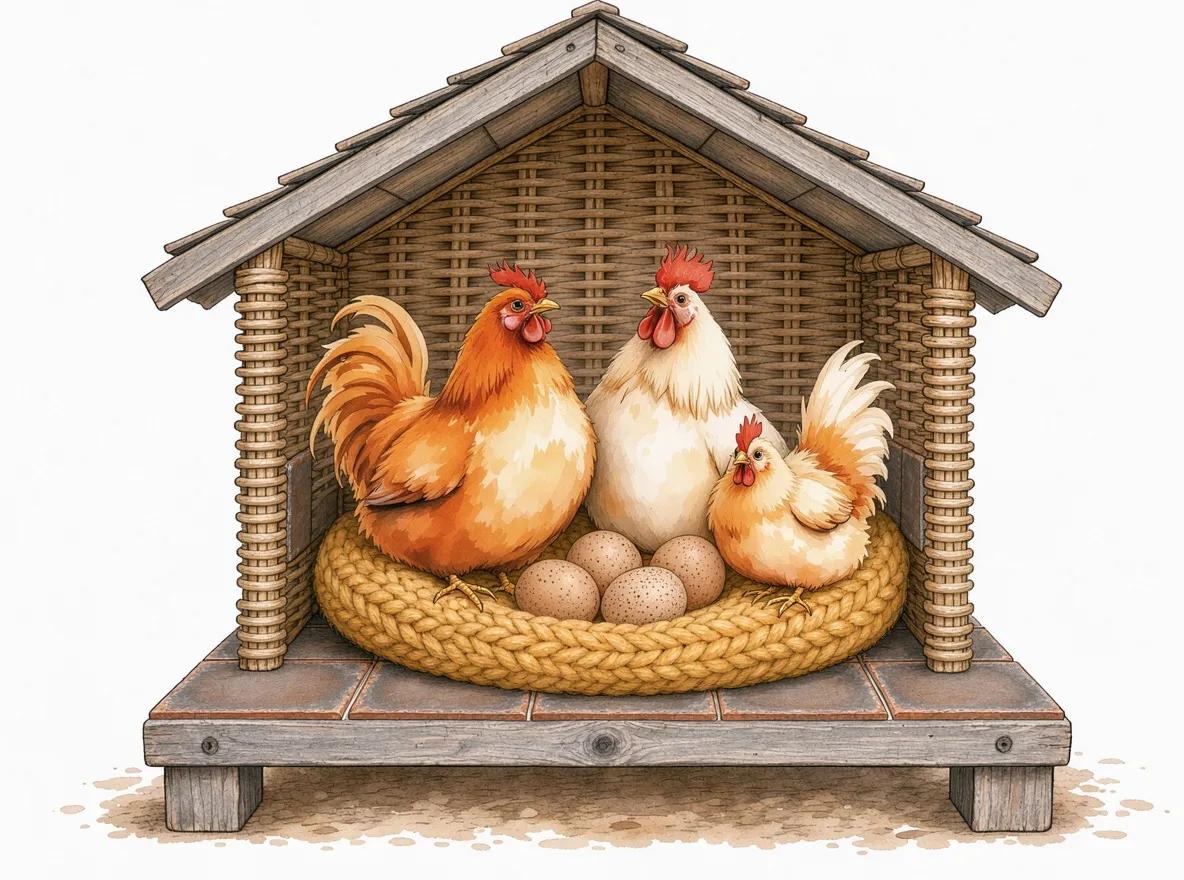
![Painted chickens beside a yellow knitted cushion in front of a wicker wall on terracotta tiles with three eggs, made with FLUX.2 [max]](/imgs/blog/flux-3-vs-flux-2/t12-chicken-house-6refs-flux-2-max.webp)
Prompt
Create a house for the chickens from image 1 using materials from images 2, 3, 4, and 5. Use the wood from image 5 for the base, the materials from images 2 and 4 for the walls and floor, and the material from image 3 for a small pillow nest. Place the chickens from image 1 in their new home, sitting on the pillow nest. Next to them, include the eggs from image 6. Apply the style of image 1 to the entire new scene.
Source: Black Forest Labs docs, FLUX.2 Image Editing (multi-reference example)
This prompt comes from BFL's own FLUX.2 editing guide, so it is home ground for FLUX.2. FLUX 3 Image still followed it more closely: an oak base, wicker walls, a tiled floor, a knitted nest with the chickens sitting on it, and the watercolor style of image 1. It did draw four eggs instead of three. FLUX.2 [max] used every material, but built more of a wooden frame than a house, left the chickens standing beside the cushion, and changed the eggs' pattern.
Verdict: FLUX 3 Image, clearly.
13. Local edit: change only the dress color
The input photo, made with FLUX1.1 [pro]:
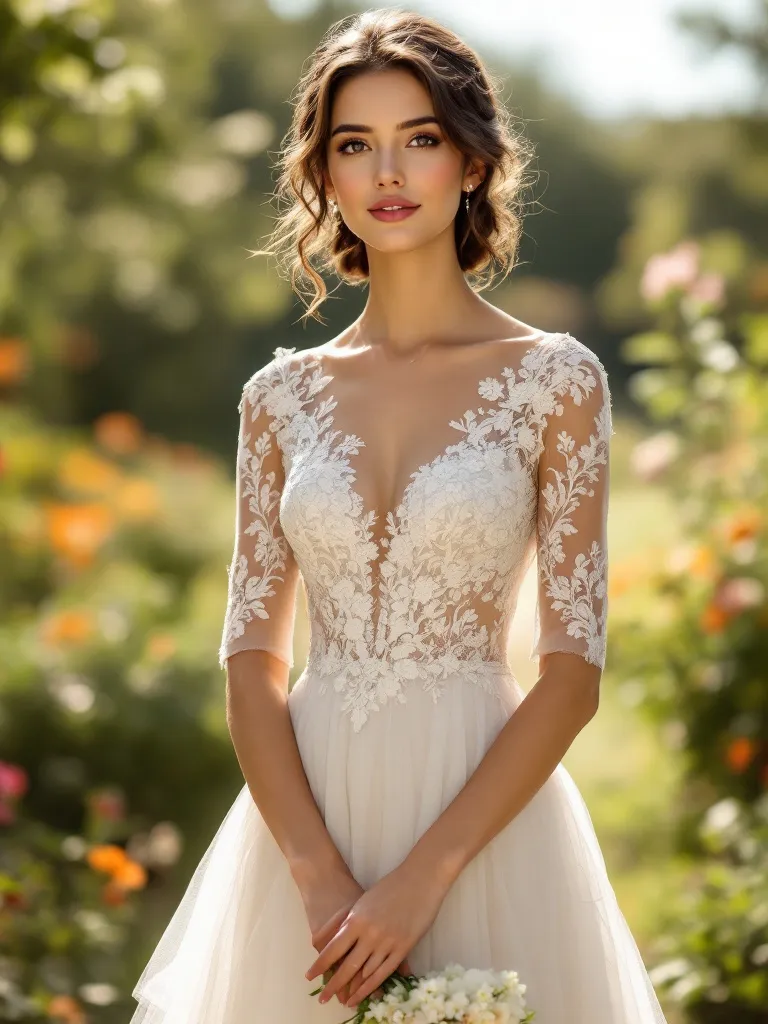
The original image both models edited.
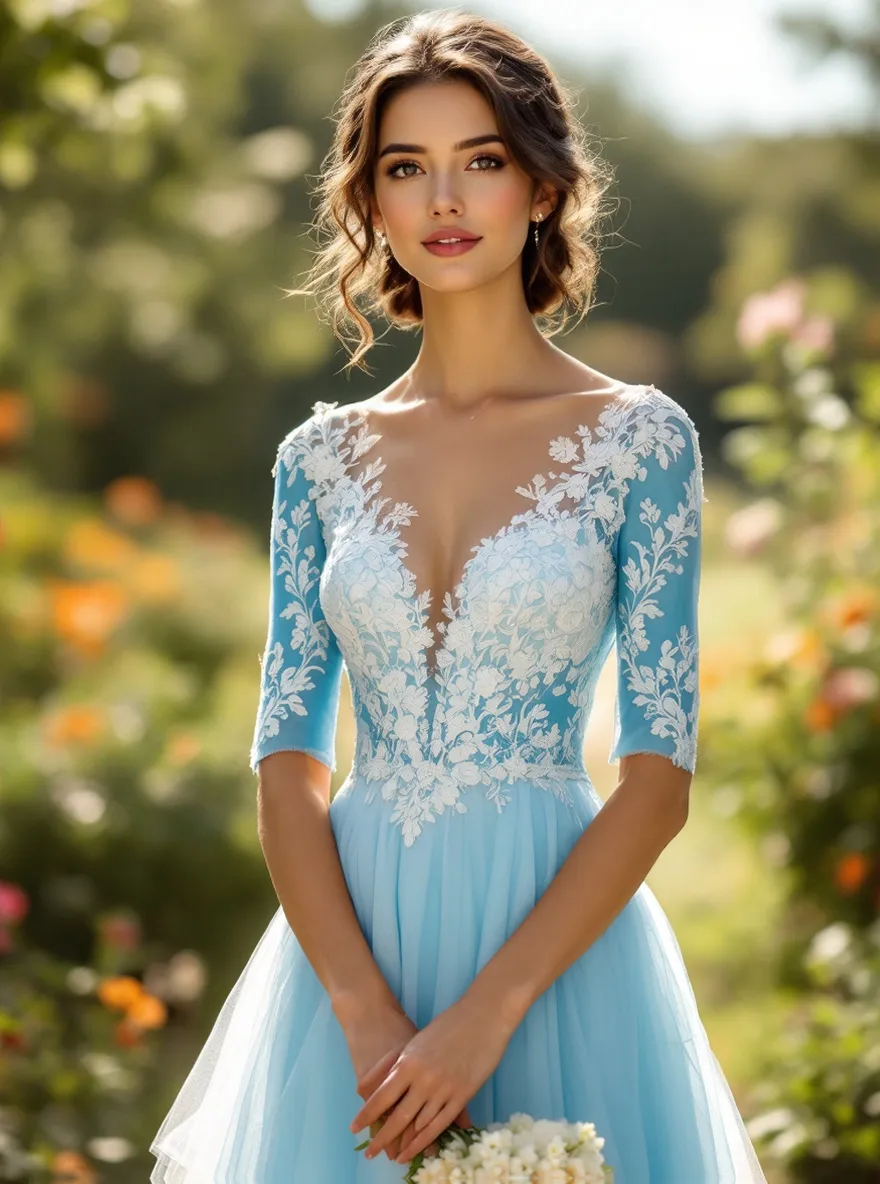
![Woman in the garden photo after the edit, sky blue skirt, white lace and sheer sleeves kept, made with FLUX.2 [max]](/imgs/blog/flux-3-vs-flux-2/t13-dress-recolor-flux-2-max.webp)
Prompt
Change the color of the woman's lace wedding dress to sky blue (light blue, #87CEEB), while keeping all lace embroidery details white and fully visible. Preserve the original fabric texture, transparency, patterns, highlights, and natural folds.
Both turned the dress sky blue and kept the lace white, the pose and the bouquet. FLUX 3 Image changed less of everything else: its average pixel difference from the original face was about half of FLUX.2 [max]'s (roughly 5 versus 11 on a 0–255 scale), and smaller in the background too. But it made the sheer sleeves solid blue, losing the transparency the prompt asked to keep. FLUX.2 [max] kept the sleeves sheer, though its bodice is a paler blue and the face shifted a little more.
Verdict: split. FLUX 3 for leaving the photo alone; FLUX.2 [max] for respecting the fabric.
FLUX 3 vs FLUX 2: what looks different
- Text rendering. The clearest difference. FLUX 3 Image got every quoted string right, punctuation included. FLUX.2 [max] gets most text right but slips on details, and its background signs drift into fake lettering.
- Detail and texture. FLUX 3 Image renders more items sharply at once: tiles, armor plates, ice. FLUX.2 [max] is more selective and lets the background fall out of focus, which often looks more photographic.
- Color and lighting. FLUX.2 [max] leans warm and cinematic, with backlight, haze and deep shadow. FLUX 3 Image lights scenes more evenly, and in the poster test it matched the named colors more closely.
- Composition and layout. FLUX 3 Image is stronger at structured layouts like diagrams, icon grids and multi-part scenes. FLUX.2 [max] was better at following spatial wording in long scene prompts ("tiny", "centered", "negative space").
- Faces and hands. Both drew natural hands holding objects. Neither handled the complex sword grip perfectly. Faces were clean on both; FLUX.2 [max] added a stray outline in the stylized portrait.
- Style range. Both moved between photo, watercolor, vector icons and game art without trouble. FLUX 3 Image kept a reference image's style more faithfully (test 12).
- Edit preservation. FLUX 3 Image disturbed the untouched parts of a photo less, but it can over-apply a change to nearby material, as with the sleeves in test 13.
FLUX 3 vs FLUX 2: which one should you use?
- Pick FLUX 3 Image for anything with words in it (ads, posters, labels, diagrams), for scenes built from several reference images, and for edits where the rest of the photo must stay put (try the FLUX 3 Image editor for those). On flux-3image a 1K FLUX 3 Image costs 2 credits, and references add nothing (pricing, as of October 2026).
- Pick FLUX.2 [max] for moody portraits, epic landscapes and long cinematic prompts where camera and mood matter more than exact text. It costs 6 credits at 1K, plus 6 per reference. You can run it from the FLUX.2 [max] page.
- What about FLUX 3 vs FLUX.2 [pro]? We tested [max] because it is the top FLUX.2 tier. [pro] costs less, at 3 credits for 1K plus 3 per reference, and we did not include it in these tests.
- Not sure which FLUX.2 tier you need? The FLUX.2 overview compares them. If your work is mostly about combining products, outfits or characters from several photos, start with multi-image FLUX.
Our FLUX 3 vs FLUX 2 test is one run per prompt. Both models vary from run to run, so if a result matters, generate a few and compare.
FAQ
Is FLUX 3 better than FLUX 2?
In our FLUX 3 vs FLUX 2 tests, FLUX 3 Image did better on text, multi-reference edits and keeping a photo intact while editing. FLUX.2 [max] still did better on moody portraits, huge-scale landscapes and some poses. Overall it was 4 wins each and 5 draws, so pick by job, not by version number.
Is FLUX 3 open source?
FLUX 3 Image is not open weight. As of October 2026, BFL offers it through its API and partners such as fal, and says open-weight access to a separate FLUX 3 Dev backbone is coming soon. You cannot download FLUX 3 Image and run it locally.
Is FLUX 3 Image out?
Yes. As of October 2026, FLUX 3 Image is available through the BFL API and on fal as fal-ai/flux-3-image, with an edit endpoint for references. All the FLUX 3 results in this comparison came from the fal endpoint.
How many reference images can FLUX 3 Image use?
Up to 10 references per request, according to BFL's documentation and the fal endpoint. FLUX.2 [max], [pro] and [flex] accept up to 8 through the API. In our test both models received the same six references.
Does FLUX 3 Image support a seed?
Not on the fal endpoint we tested: it has no seed field, so the same prompt can give a different image each run. FLUX.2 [max] does take a seed, and we used seed 42 for every FLUX.2 [max] image in this comparison.