

| Models | FLUX.1 Kontext [pro] and FLUX.1 Kontext [max] by Black Forest Labs, called through the fal API |
|---|---|
| Input | One photo plus a written instruction, or a text prompt on its own |
| Output | One image of about 1 megapixel; 9 aspect ratios from 21:9 to 9:21, or auto to match your photo |
| Waiting | Results usually arrive while you stay on the page |
| Credits per image | Kontext [pro]: 4 · Kontext [max]: 7 |
| Commercial use | Allowed for all users, per our Terms |
| What it can't do | One reference photo per edit here, no masks, no 2K or 4K output |
What is FLUX.1 Kontext?
FLUX.1 Kontext is an image model from Black Forest Labs that reads a picture and a written instruction together. You upload a photo, type what should change, and Kontext edits that part while keeping the rest. It also generates images from text alone. It comes in two versions, Kontext [pro] and Kontext [max].
Black Forest Labs released FLUX Kontext in 2025 as part of the FLUX.1 family. It was one of the first models where you could edit a photo just by describing the change, with no mask and no layers. BFL now points new projects toward FLUX.2 and FLUX 3, but FLUX Kontext is still a quick, low-effort editor for single photos, and many people already know how to prompt it.
Edit a photo with one sentence
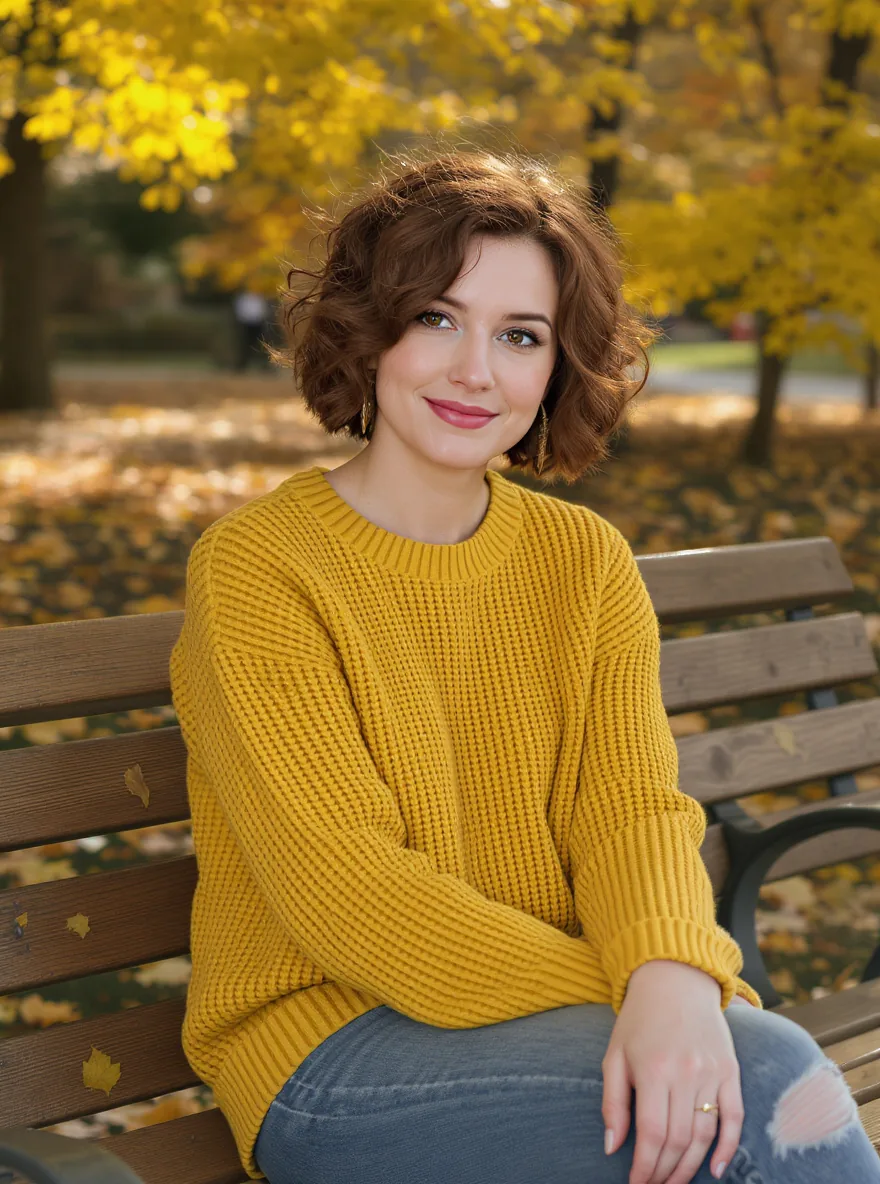
This portrait is the starting point. We created it with Kontext [pro] from a text prompt, then used it as the input for an edit. The instruction was a single sentence. Put her on a snowy city street at dusk, in a dark wool coat over the same sweater, holding a paper cup of coffee. Keep her face, hair and expression the same.
That pattern (what changes, then what stays) is most of what you need to know about the FLUX Kontext image editor. You don't select anything. The model works out which pixels belong to "her face" or "the sweater" from the words.
Same person, new scene

Here is the Kontext [pro] result. The setting, season, light and coat all changed. Her curly auburn hair, face and the mustard sweater carried over. This is the character consistency that made FLUX Kontext popular: you can move one subject through several scenes without retraining anything.
For a longer series, edit step by step. Change the location first, then the outfit, then the weather. Each result becomes the input for the next edit, and small steps drift less than one big rewrite.
Replace text on signs, labels and posters

Kontext treats words in quotation marks as text to change. To swap the wording on this café sign, the prompt only needed to name the old and new words: replace 'Morning' with 'Evening'. We also asked for a sunset sky in the same request.
Text edits like this are useful for menus, shop signs, book covers and product mockups, where retyping the words in a design tool would mean rebuilding the whole graphic.
Kontext [max] for harder edits

We ran the sign edit on Kontext [max]. "Evening" replaced "Morning" in the same white serif letters, the paint wear on the wood stayed, and the blue sky became a warm orange sunset. The rope, the bracket and the café front didn't move.
Black Forest Labs positions [max] as the higher-quality Kontext model, with better prompt following and typography. It costs more credits per image. A practical rule: start with FLUX Kontext pro, and switch to FLUX Kontext max when an edit involves text, small details or a prompt that [pro] keeps getting wrong.
FLUX Kontext pro vs max
| Kontext [pro] | Kontext [max] | |
|---|---|---|
| Good for | Everyday edits, scene changes, quick drafts | Text replacement, fine details, tricky prompts |
| Credits per image | 4 | 7 |
| Text to image | Yes | Yes |
| References per edit | 1 | 1 |
Both versions take the same prompt, so you can run an edit on Kontext pro, check the result, and re-run only the hard cases on Kontext max.
How to use the FLUX Kontext image editor
- Choose FLUX Kontext in the model menu, then pick [pro] or [max].
- Upload one photo, or skip this step to generate from text only.
- Write the change. Start with the action ("Change", "Replace", "Add", "Remove"), name the object, and end with what should stay the same.
- Pick an aspect ratio, or leave it on auto to keep the shape of your photo.
- Generate. If the result is close but not right, use it as the next input instead of starting over.
Prompts that FLUX Kontext follows
- Name things the way you would to a person. "The woman in the yellow sweater" works better than "the subject".
- Quote text exactly. Replace 'joy' with 'hope' changes one word. Without quotes, Kontext may restyle the whole sign.
- Say what to keep. "Keep her face, hair and pose the same" protects identity during scene changes.
- Describe styles concretely. "Pencil sketch with cross-hatching" beats "make it artistic".
- One idea per pass. Three short edits usually beat one prompt with three changes.
Is FLUX Kontext free?
FLUX.1 Kontext is not free to run here. Every Kontext [pro] or [max] request costs credits, because each one is a paid call to the Kontext API. Accounts created with Google sign-in get a few free credits, enough for a first test edit. The free daily images on flux-3image use a different model, FLUX.2 [klein] 4B.
The free Kontext checkpoint you may have seen, FLUX.1 Kontext [dev], is an open-weights version for running on your own GPU. It is licensed for non-commercial use, and we don't host it.
When to use FLUX 3 Image instead
FLUX Kontext edits one photo at a time. Some jobs need more: a product placed on a background from another photo, or a character wearing an outfit from a second image. For those, or for 2K and 4K output, switch to FLUX 3 Image on the home page. It accepts 1 to 10 references in one request. For edits inside an exact region you paint yourself, FLUX Fill gives you mask-level control.
Is FLUX Kontext still worth using now that FLUX 3 is out?
Yes, for quick single-photo edits. Kontext [pro] costs fewer credits than FLUX 3 Image and needs only one photo and one sentence. Use FLUX 3 Image when you need several references, 2K or 4K output, or more precise layout control.
Can FLUX Kontext edit multiple images at once?
Not on flux-3image. Each Kontext request here takes one input photo. To combine two to ten images in one request, use FLUX 3 Image, which reads every reference and lets you say what each one contributes.
Does FLUX Kontext keep the same face?
Usually, if you ask it to. Add a line such as "keep her face, hair and expression the same" to the prompt. Identity holds up most reliably when you change one thing per edit and the face is clearly visible in the input photo.
Can FLUX Kontext create images from text only?
Yes. Leave the upload empty and FLUX Kontext works as a text-to-image model. The portrait and the café sign on this page both started as Kontext text-to-image results before we edited them.
Is FLUX.1 Kontext made by flux-3image?
No. FLUX.1 Kontext is developed by Black Forest Labs. flux-3image is an independent app, not affiliated with Black Forest Labs, that runs Kontext through the fal API and gives you a simple editing interface.
Updated