
FLUX AI Avatar Ideas: Six Profile Picture Styles and Prompts
Choose a FLUX AI avatar style with six real edits of one portrait, exact prompts, 96-pixel circular previews, and a 1K credit-cost guide.
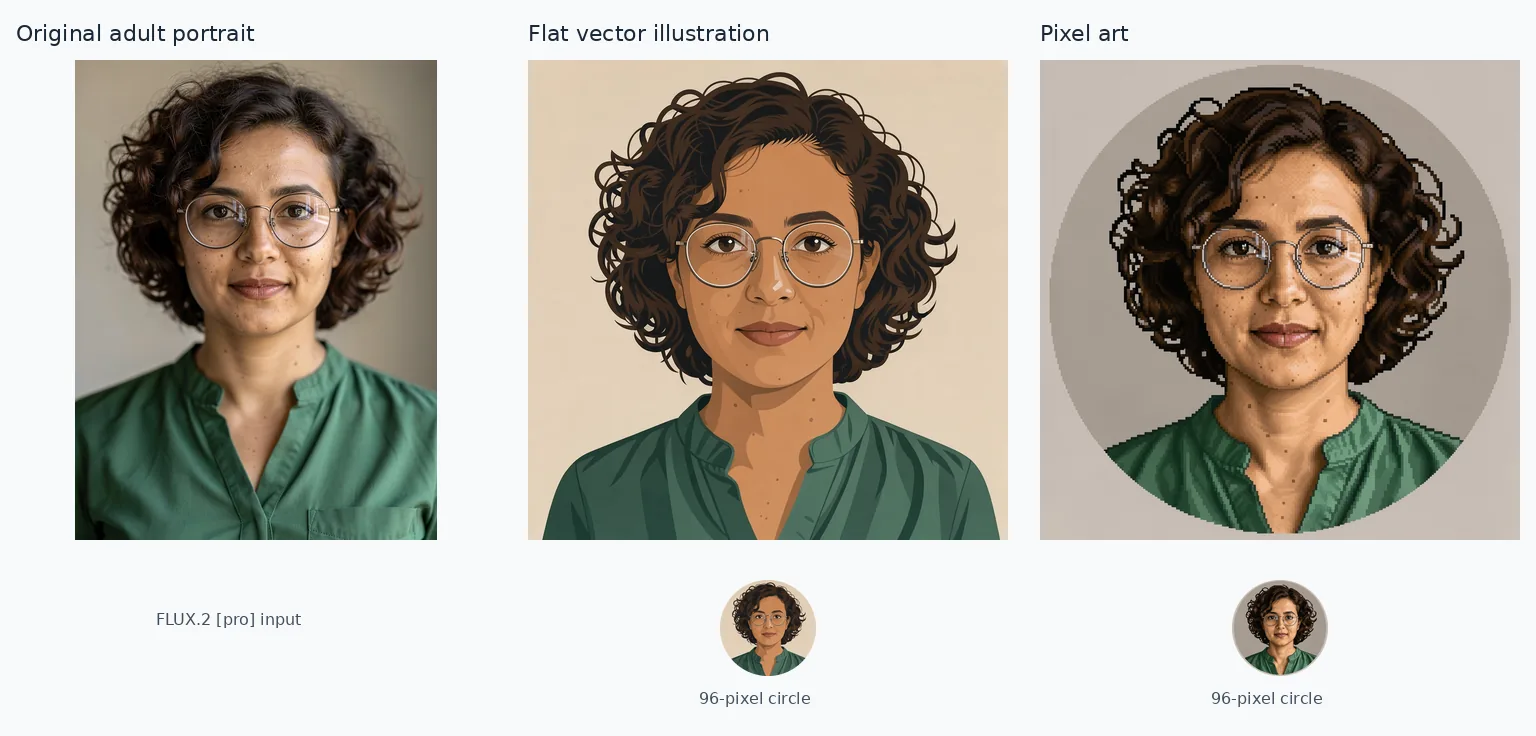
To make a FLUX AI avatar for a profile picture, upload a portrait to the FLUX 3 Image editor on flux-3image, name the style, and specify which features to keep. Choose a square frame with space around your hair for a circular crop. In the six examples below, clay and flat vector styling give the clearest small previews; watercolor keeps more of the original portrait’s detail.
Which features carry across all six avatar styles?
The starting portrait is a fictional adult woman with short dark curls, round glasses, and a green shirt, generated with FLUX.2 [pro]. Each style uses that same original as its sole reference, with one FLUX 3 Image request at 1K, 1:1. The prompts were sent as written, without prompt expansion.
Her curls, glasses, and shirt remain recognizable across the results. Clay enlarges her eyes and smooths facial detail, so the likeness is more stylized. Compare the face as well as the accessories when choosing your own avatar.
These are still profile pictures. The small circles below were made by reducing each complete square output to 96 pixels and applying a circular mask. The FLUX style-transfer tool also lets you restyle a photo with a written instruction.
Should you choose flat vector styling or pixel art?
The vector-style result uses outlined curls, broad face shadows, and a beige background. The pixel-art result keeps more photographic shading and freckles, with stepped edges around the hair and a gray disk behind the portrait. “Vector” describes the look here: the generated file is a raster image.
Flat vector illustration — exact prompt:
Make a flat vector illustration profile avatar of the adult woman in image 1. Keep her recognizable face shape, curly hair, round glasses and green shirt. Center her head and shoulders with generous headroom, a plain background and margins for a circular crop.
Pixel art — exact prompt:
Make a pixel art profile avatar of the adult woman in image 1. Keep her recognizable face shape, curly hair, round glasses and green shirt. Center her head and shoulders with generous headroom, a plain background and margins for a circular crop.
Left: FLUX.2 [pro] reference, 880 × 1168 pixels. Center: vector-style result. Right: pixel-art result. Both edits: FLUX 3 Image, 1K, 1:1, 1024 × 1024 pixels; full outputs above 96-pixel circular previews.
At 96 pixels, the vector version’s simple shading gives the face a clear outline. The pixel version’s face and glasses are readable, but its blocky texture mostly disappears. Choose vector styling for a small icon; judge pixel art at the size where you will actually use it.
Would a clay figure or ink portrait suit your profile?
Clay turns the curls into rounded coils and gives the glasses thick silver frames. Ink keeps finer facial detail, with lines across the cheeks, neck, and shirt. The ink result also retains warm skin tones and green clothing; this prompt produced a colored drawing.
Clay-style 3D rendering — exact prompt:
Make a clay-style 3D rendering profile avatar of the adult woman in image 1. Keep her recognizable face shape, curly hair, round glasses and green shirt. Center her head and shoulders with generous headroom, a plain background and margins for a circular crop.
Ink line drawing — exact prompt:
Make a ink line drawing profile avatar of the adult woman in image 1. Keep her recognizable face shape, curly hair, round glasses and green shirt. Center her head and shoulders with generous headroom, a plain background and margins for a circular crop.
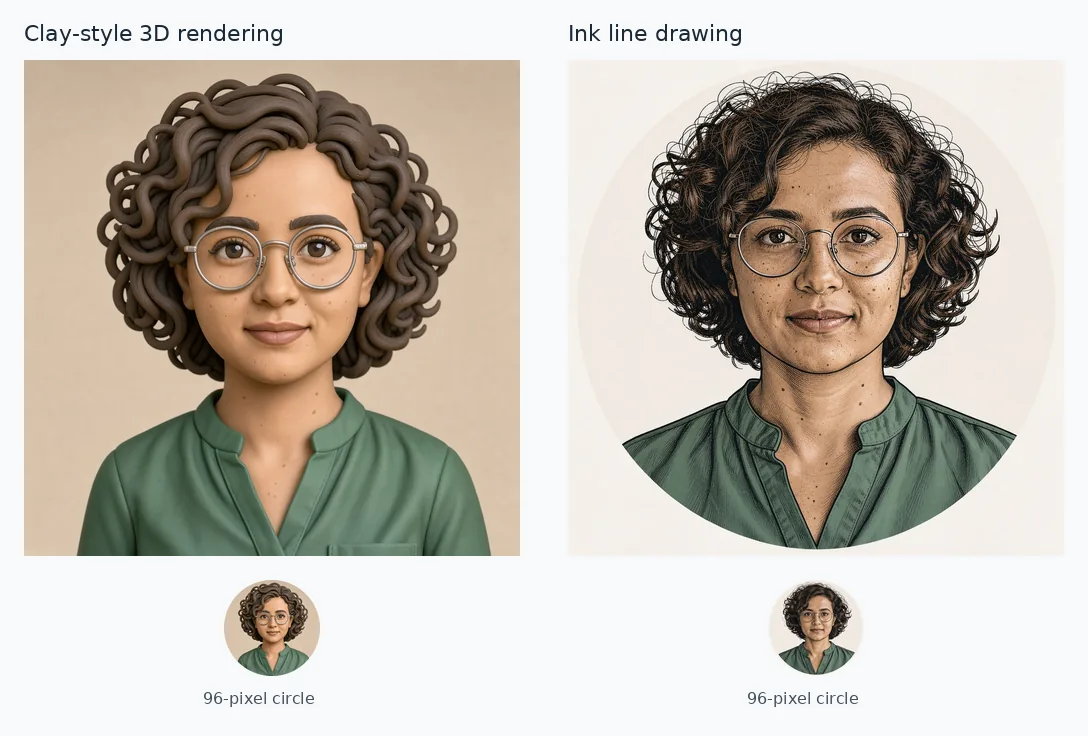
Left: clay-style 3D rendering. Right: colored ink drawing. Both: FLUX 3 Image, 1K, 1:1, 1024 × 1024 pixels; full outputs above 96-pixel circular previews.
Choose clay for a sculpted character look: its eyes, glasses, and curls remain distinct in the small circle. Choose ink for a drawn portrait with more facial texture. The clay image depicts a 3D-style figure; the output is a still image, with no 3D model attached.
How different are watercolor and digital painting?
Watercolor adds paper texture and translucent washes, especially in the pale green shirt and loose brown strokes around the curls. Freckles and round glasses remain visible. The digital-painting request returned a photographic-looking portrait with a gray background and softly shaded shirt folds; it shows little obvious painted texture.
Watercolor — exact prompt:
Make a watercolor profile avatar of the adult woman in image 1. Keep her recognizable face shape, curly hair, round glasses and green shirt. Center her head and shoulders with generous headroom, a plain background and margins for a circular crop.
Semi-realistic digital painting — exact prompt:
Make a semi-realistic digital painting profile avatar of the adult woman in image 1. Keep her recognizable face shape, curly hair, round glasses and green shirt. Center her head and shoulders with generous headroom, a plain background and margins for a circular crop.
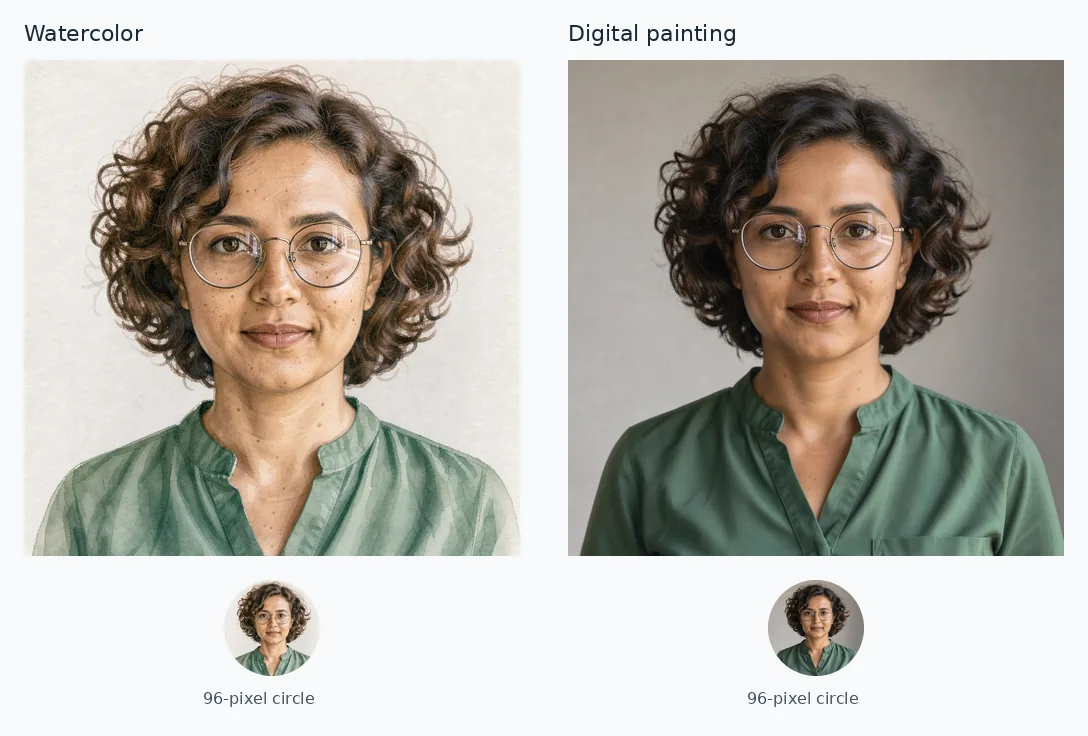
Left: watercolor. Right: result of the semi-realistic digital-painting prompt. Both: FLUX 3 Image, 1K, 1:1, 1024 × 1024 pixels; full outputs above 96-pixel circular previews.
Watercolor gives the larger portrait a visibly painted finish. At 96 pixels, much of that texture fades and both results read as detailed faces. Pick the watercolor for its light background and washes; pick the digital result if you want a photo-like avatar.
Which style should you try for a small profile circle?
For this portrait, start with clay if you want a character-like avatar, or vector styling if you want a flatter illustration. Use the table to match the other finishes to your preference.
| Style | What remains clear at 96 pixels? | Choose it for |
|---|---|---|
| Flat vector illustration | Dark curl outline, round glasses, broad shading | A simple illustrated icon |
| Pixel art | Face and glasses; little visible pixel texture | A detailed retro portrait at larger sizes |
| Clay-style 3D rendering | Rounded curls, large eyes, thick frames | A sculpted character appearance |
| Ink line drawing | Dark hair silhouette, face detail, round glasses | A colored drawn portrait |
| Watercolor | Face and glasses against a light background | Soft washes in the larger image |
| Semi-realistic digital painting | Photo-like face, dark curls, gray background | A subtle photographic finish |
View your favorite at the smallest size it will appear, such as beside a chat message. Check the circular crop before saving it: the top and sides of the hair should fit, and the face should be large enough to recognize. These previews keep the whole square; your profile app may let you zoom in for a tighter crop.
How can you make these avatars from your own photo?
Sign in, select FLUX 3 Image, and upload a clear JPG, PNG, or WebP portrait at least 256 pixels on both sides. Choose 1:1 under Size and 1K under Quality. Adapt a prompt above to your hairstyle, glasses, clothing, and other recognizable features, then generate.
Use the original photo as the reference for each new style. For an invented character, the FLUX 2 portrait prompt guide shows how to describe appearance, lighting, and framing. To put that character into new scenes, use the consistent-character tool.
As of October 2026, the live pricing page lists FLUX 3 Image at 2 credits per 1K image, with no reference-image surcharge. Six completed style requests cost 12 credits at that rate; additional completed reruns cost more.
Frequently asked questions
Is the FLUX AI generator free?
On flux-3image, the separate FLUX.2 [klein] option is free at 1K and can edit one uploaded photo. The gallery here uses credit-based FLUX 3 Image. These images do not show the free model’s results.
Is FLUX AI actually good for avatars?
These six results keep the reference woman’s dark curls, round glasses, and green shirt recognizable. Clay and vector styling give clear small icons; watercolor and ink retain more facial texture in the larger images. The gallery uses one fictional portrait with one result per style. Likeness on other photos can vary.
Can these FLUX avatars talk or move?
The workflow here produces still images. flux-3image does not provide video generation or lip sync.