
FLUX 2 Prompt Guide: Three Portrait Prompts for Pro
Write FLUX.2 Pro portrait prompts for subject, lighting, and framing. Compare three real outputs with exact prompts, settings, and credit costs.

Write FLUX 2 prompts in plain sentences: describe the subject and action first, then lighting and style, then framing. For portraits, specify where the hands go and how much of the person fits in the image. The FLUX.2 Pro generator on flux-3image, an independent app for Black Forest Labs models, lets you try the three exact portrait prompts below.
What belongs in a FLUX 2 portrait prompt?
Build the description around three questions: Who is in the scene? How should it look? What needs to fit in the frame?
| Prompt part | Details to name | Wording used below |
|---|---|---|
| Subject and setting | Person, appearance, activity, location | “a ceramic artist with short dark hair, waist-up at a pottery workbench” |
| Lighting and style | Light direction, photographic look | “Soft window light from the left, 50mm portrait photograph, natural skin texture” |
| Composition | Background, hand placement, crop | “both hands visible resting on the bench, the subject centered with headroom” |
As of October 2026, BFL’s FLUX.2 prompting guide recommends describing the subject, action, style, and context, with the most important elements first. Use the table as a starting point, then write the details that matter to your portrait. “At a pottery workbench” leaves the activity open; “shaping a pot” asks for a particular action.
Which Pro settings should you use for these portraits?
To match the examples:
- Sign in and select FLUX.2 [pro] in the model menu.
- Leave Add a photo empty for text-to-image generation.
- Select 3:4 under Size and 1K under Quality.
- Paste one complete prompt below and click Generate.
The site sends the prompt as typed, without prompt expansion. As of October 2026, the live pricing page lists Pro text-to-image generation at 3 credits for 1K and 10 credits for 2K. Running all three prompts once at 1K costs 9 credits. The separate free FLUX.2 [klein] option is a different model; these outputs all use Pro.
Each pictured prompt was submitted once with no reference image. All three files are 880 × 1168 pixels. The 1K label names the output tier; the selected aspect ratio determines the shape.
Step 1: How much can the subject sentence establish?
Start with a person, a crop, and a setting. This prompt names the artist’s age and hairstyle but leaves the pose, clothing details, and studio furnishings open.
Exact prompt:
A fictional fully clothed 35-year-old ceramic artist with short dark hair, waist-up at a pottery workbench.
FLUX.2 [pro], 1K, 3:4; 880 × 1168 pixels. Complete input: the single sentence above; no reference image.
The artist wears a shirt and clay-stained apron, with both hands around a pot on a wheel. Shelves of pottery fill the background, and a window on the left lights the scene. The model supplied those details without explicit instructions for them.
If the gaze matters, name it. “Looking down at the pot” asks for an activity portrait; “facing the viewer” asks for direct engagement. Those are suggested revisions to try; the image above used only the quoted prompt.
Step 2: How do you describe light and a photographic look?
Keep the subject sentence and add the direction of the light, a lens cue, and a skin-texture description.
Exact prompt:
A fictional fully clothed 35-year-old ceramic artist with short dark hair, waist-up at a pottery workbench. Soft window light from the left, 50mm portrait photograph, natural skin texture.
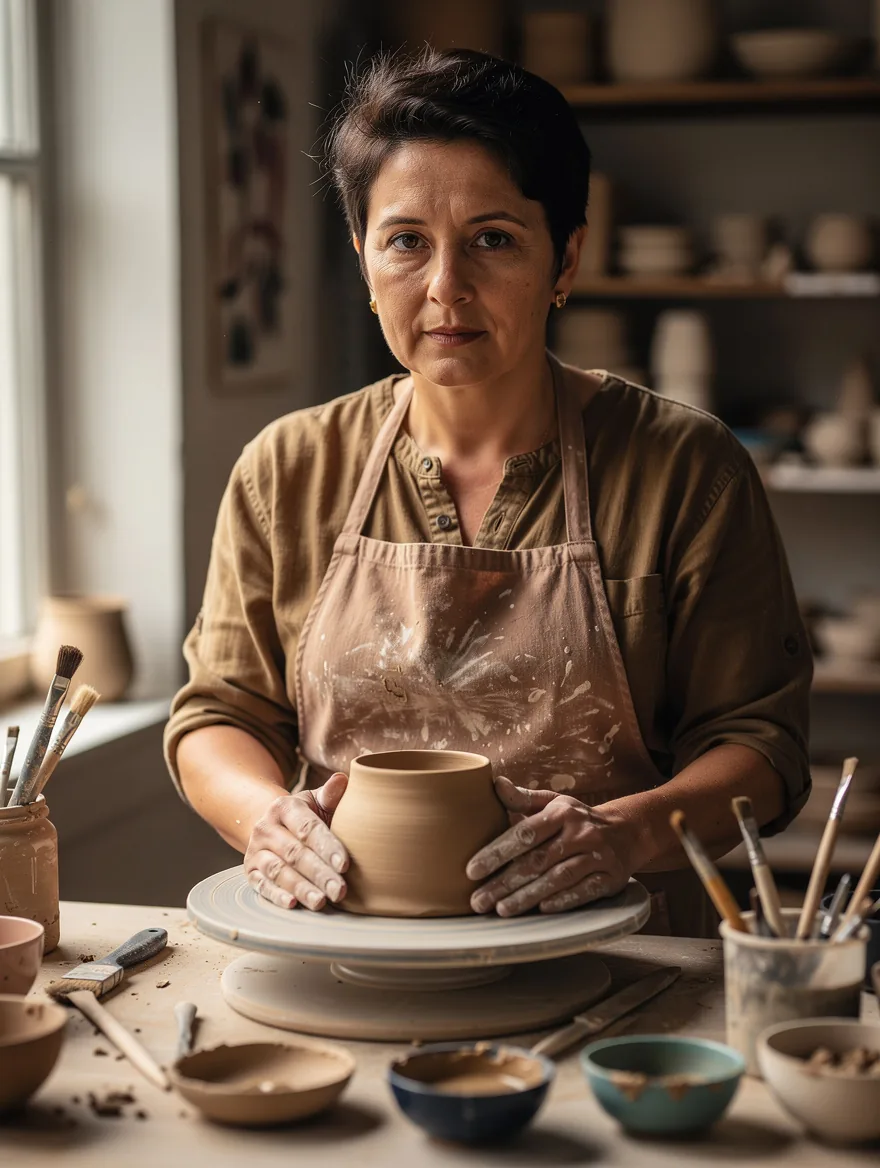
FLUX.2 [pro], 1K, 3:4; 880 × 1168 pixels. Complete input: the two sentences above; no reference image.
This result faces the viewer. Light falls across the face from the left, with shadow on the right and visible skin texture. Both hands surround a pot, while brushes and bowls occupy the foreground. The shelves behind the artist are softly blurred.
“50mm portrait photograph” gives the model a photographic style cue. Judge it by the generated appearance: face detail, perspective, and background blur. There was no physical camera or lens involved.
Step 3: How do you ask for visible hands and headroom?
Add hand placement, a simpler background, and space above the head. These instructions specify what should be visible when you need a portrait of the person at the bench.
Exact prompt:
A fictional fully clothed 35-year-old ceramic artist with short dark hair, waist-up at a pottery workbench. Soft window light from the left, 50mm portrait photograph, natural skin texture. An uncluttered studio wall, both hands visible resting on the bench, the subject centered with headroom.
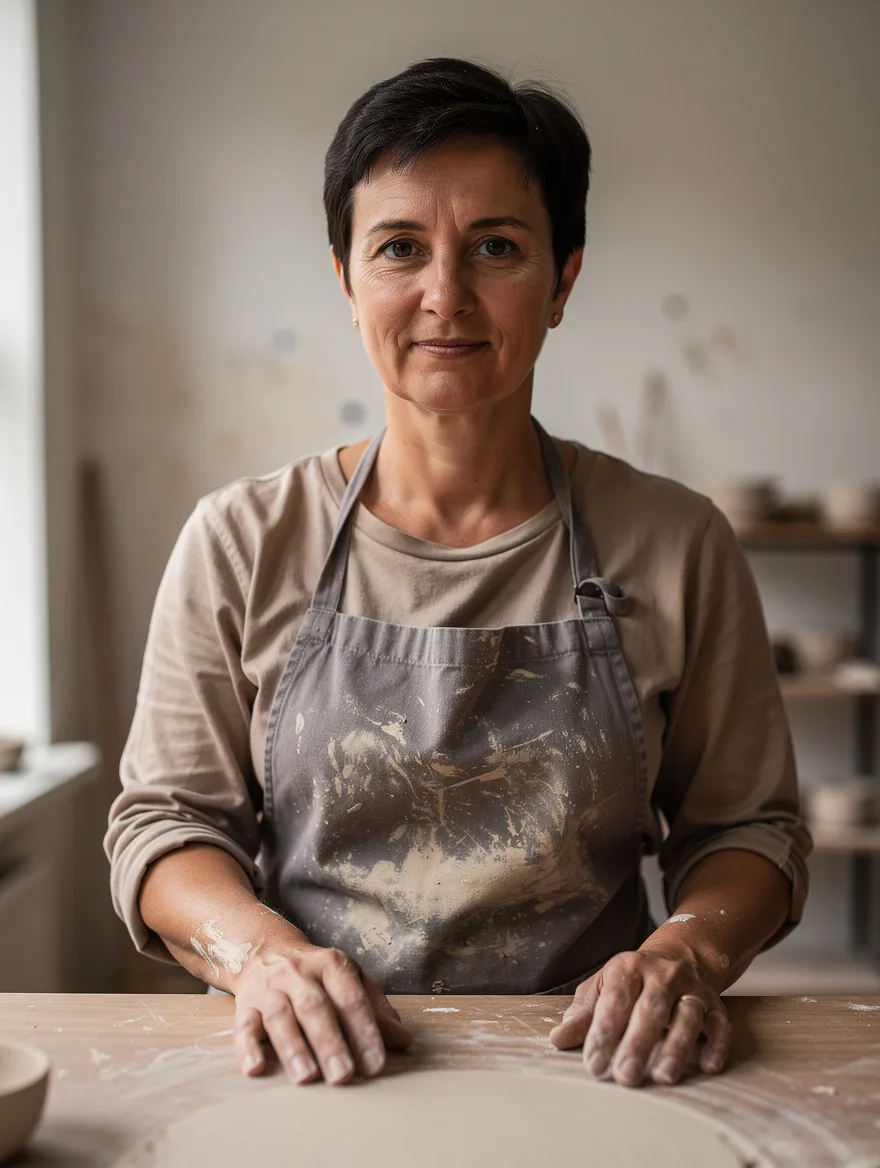
FLUX.2 [pro], 1K, 3:4; 880 × 1168 pixels. Complete input: all three sentences above; no reference image.
Both hands rest on the wooden bench. The entire head fits inside the frame, and the wall behind it is mostly plain, with blurred studio objects near the edges. The pot and wheel are absent, so the image emphasizes the person over pottery-making. If you need the activity, specify the hands working on a pot in your version.
The faces, clothing, and props vary across these separate generations, and the first image already had left-side window light. The sequence shows which requested details appeared, but it cannot isolate the effect of each added sentence or preserve one exact person across reruns.
Should you use JSON or negative prompts?
Plain sentences are enough to describe this single-subject scene. BFL’s guide also supports JSON prompts for organizing more complex scenes, such as several subjects with different positions and actions. The three examples here use natural language throughout.
FLUX.2 does not support negative prompts. Describe the desired result directly: “a plain studio wall” gives the model a background to draw, and “both hands visible on the bench” gives it a placement instruction. Keep the full prompt consistent: hands resting on a bench describe a different pose from hands shaping clay.
For a change to an image you already like, upload it in the Kontext editor and name both the change and the features to retain. The Kontext clothing examples show that instruction pattern. To compare model families before choosing one, see the FLUX 3 vs FLUX 2 examples, which use the same prompts across paired outputs.