
FLUX Kontext Examples: Six Before-and-After Edits
Compare six FLUX Kontext edits with exact prompts for text, objects, lighting, and materials, including a cup move that missed its target.
FLUX Kontext can replace text, add or move objects, change lighting, and swap materials in an existing image. These six FLUX Kontext examples show the results and exact prompts for each task. To try one, upload a photo to the Kontext editor on flux-3image, an independent app that runs Black Forest Labs models, and describe the change plus the details to preserve.
Each edit below uses FLUX.1 Kontext [pro] and starts from the same fictional café image, generated with FLUX.2 [pro]. The prompts were sent as written, without expansion. The original is 1168 × 880 pixels; each edited output is 1184 × 880 pixels, with no aspect-ratio override. The edits are separate versions: the evening scene does not inherit the moved cup or added vase.
| Edit | Visible result |
|---|---|
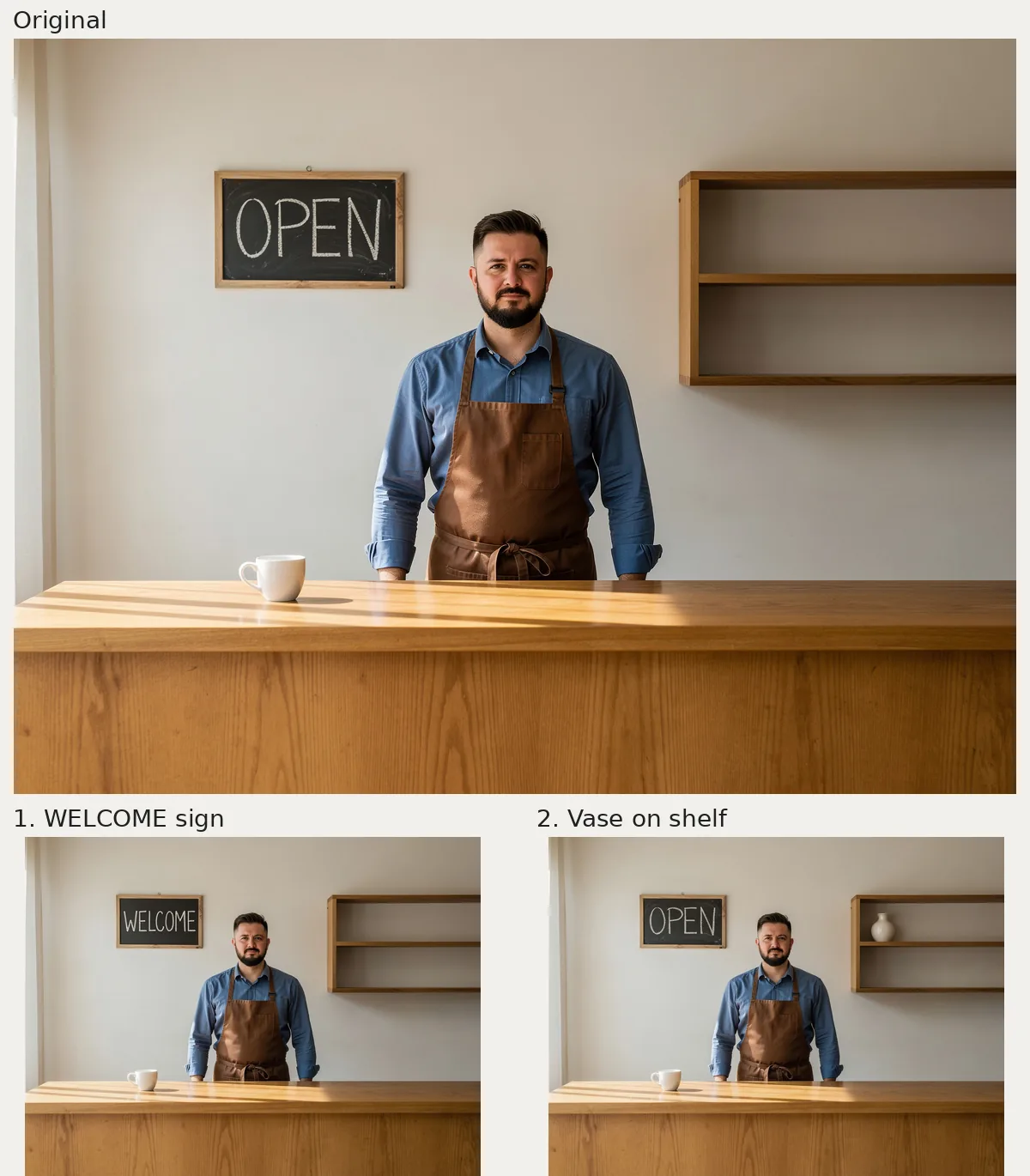
| Replace sign text | OPEN becomes WELCOME in white chalk lettering |
| Add a vase | One cream vase appears on the upper shelf |
| Move the cup | One cup moves right, but stops short of the end; its handle reverses |
| Change lighting | The café becomes much darker with amber illumination |
| Change material | The countertop becomes white marble; the front stays wooden |
| Add food | One croissant appears beside the cup |
Can Kontext replace OPEN with WELCOME on a chalkboard?
Top: FLUX.2 [pro] original, 1168 × 880 pixels. Bottom left: WELCOME sign. Bottom right: cream vase on the upper shelf. Each edit: FLUX.1 Kontext [pro], 1184 × 880 pixels.
Exact prompt:
Replace the word 'OPEN' on the chalkboard with 'WELCOME'. Keep the white uppercase chalk lettering style and the same chalkboard frame. Keep the ceramic cup, empty shelf, oak counter and daylight unchanged. Keep the barista's facial features, hair, expression, pose, blue shirt and brown apron unchanged. Keep the camera angle, framing and all unrelated objects unchanged.
The bottom-left result reads WELCOME, spelled correctly. The longer word fits inside the frame in narrower white chalk letters. The barista, cup, and empty shelves remain in the same arrangement.
For a sign edit, quote both the old text and the replacement. Specify the lettering style if it matters, and check how the new word fits: a longer replacement may need narrower or smaller letters, as it did here.
Can Kontext add a vase to an empty shelf?
Exact prompt:
Add one small cream ceramic vase on the empty wooden shelf on the right back wall. Keep the shelf itself, 'OPEN' chalkboard, ceramic cup, oak counter and daylight unchanged. Keep the barista's facial features, hair, expression, pose, blue shirt and brown apron unchanged. Keep the camera angle, framing and all unrelated objects unchanged.
The bottom-right result above adds a cream vase with a rounded body and narrow neck to the upper shelf. The shelving stays in place, the board still says OPEN, and the cup remains on the left side of the counter.
The prompt names the shelving but leaves the choice of level open. If you need a particular spot, specify “upper shelf” or “bottom shelf” in your instruction.
Can Kontext move the cup to the right end of the counter?
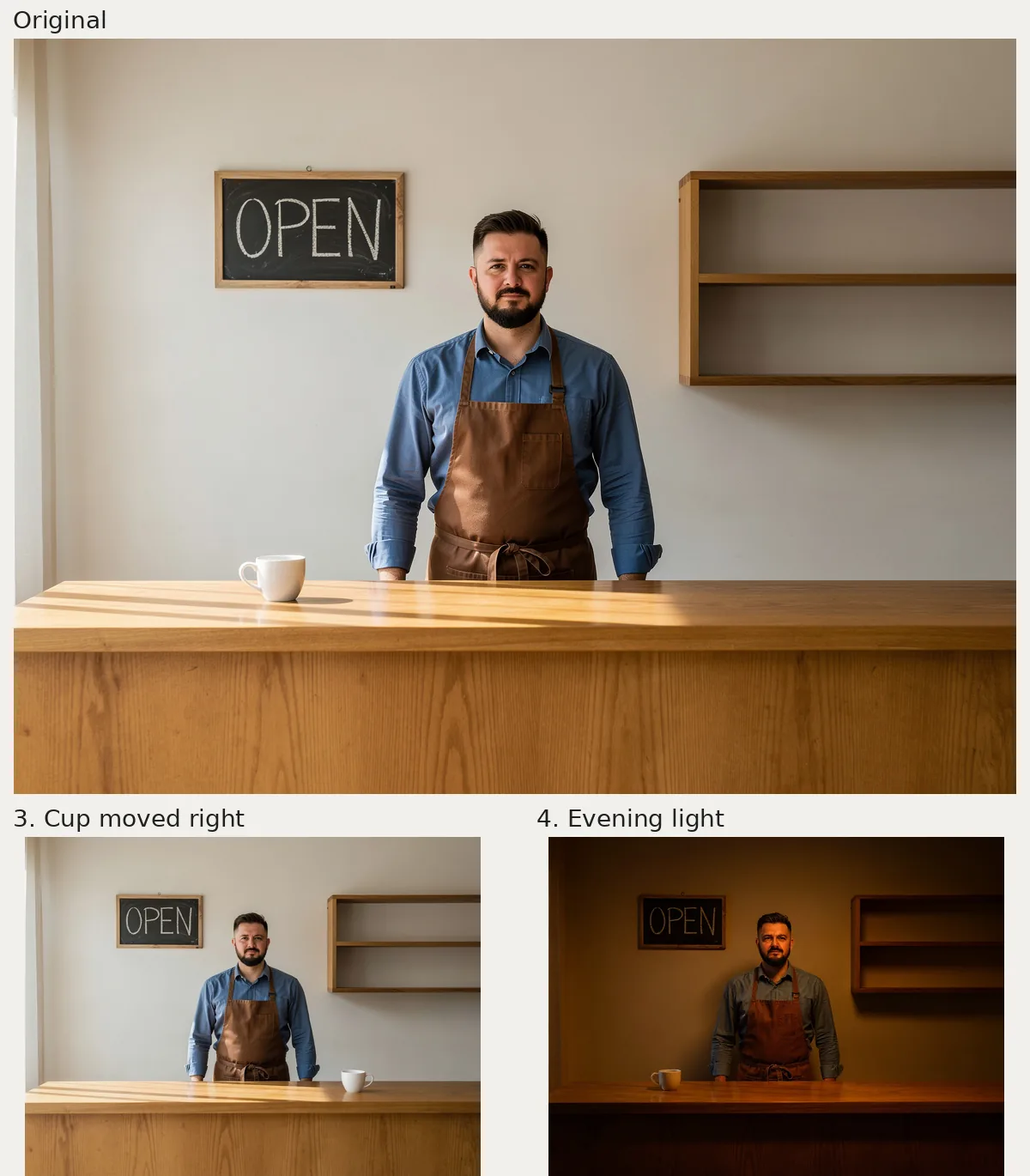
Top: FLUX.2 [pro] original, 1168 × 880 pixels. Bottom left: cup moved right, short of the requested end, with its handle reversed. Bottom right: dark amber evening light. Each edit: FLUX.1 Kontext [pro], 1184 × 880 pixels.
Exact prompt:
Move the white ceramic cup from its current position to the right end of the counter. Leave its old position empty and keep only one cup. Keep the 'OPEN' chalkboard, empty shelf, oak counter and daylight unchanged. Keep the barista's facial features, hair, expression, pose, blue shirt and brown apron unchanged. Keep the camera angle, framing and all unrelated objects unchanged.
The cup moves to the right of the barista, its former spot is empty, and only one cup remains. However, it stops short of the counter's far right end, and its handle flips from left to right. This result would need another edit if exact placement or handle direction mattered.
To adapt the prompt, name the destination, ask to clear the old spot, and state that only one copy should remain. Inspect the result for all three details; “moved right” is only part of this request.
Can Kontext turn daylight into warm evening light?
Exact prompt:
Change the daylight to warm evening illumination, with a soft amber glow across the café. Keep the 'OPEN' chalkboard, ceramic cup, empty shelf and oak counter in their original positions and materials. Keep the barista's facial features, hair, expression, pose, blue shirt and brown apron unchanged. Keep the camera angle, framing and all unrelated objects unchanged.
The bottom-right result above is much darker, with amber illumination across the wall, face, apron, and counter. The bright daylight bands on the countertop disappear. The cup stays on the left, and the shelves stay empty.
This works as a mood change, though the sign and counter front become harder to see. If those details matter, you could request a brighter evening scene on a follow-up edit; that variation is not shown here.
Can Kontext change only the countertop to marble?
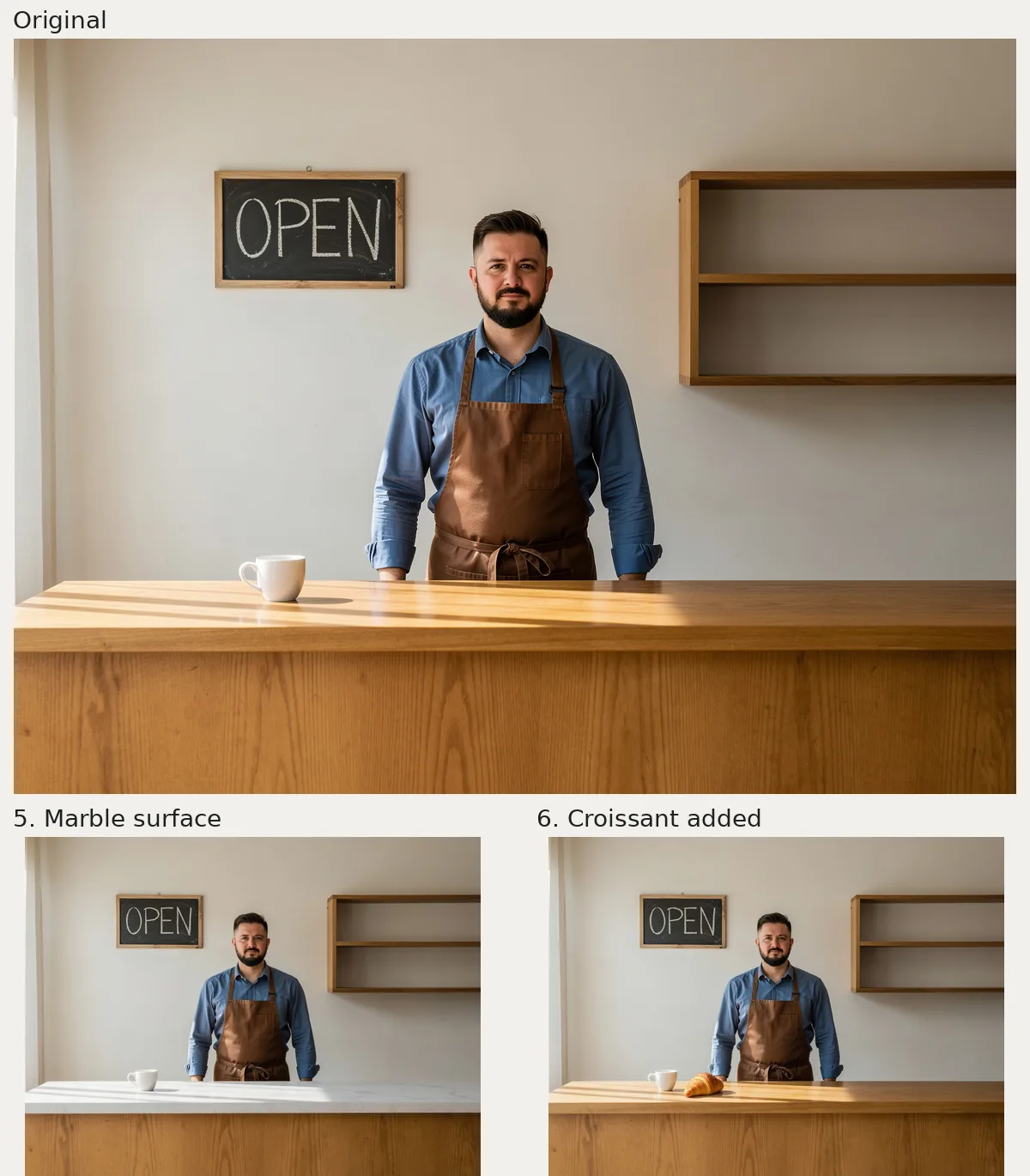
Top: FLUX.2 [pro] original, 1168 × 880 pixels. Bottom left: white marble top with wooden front retained. Bottom right: croissant beside the cup. Each edit: FLUX.1 Kontext [pro], 1184 × 880 pixels.
Exact prompt:
Replace only the oak counter's horizontal top surface with white marble with subtle gray veins. Keep the wooden vertical counter front unchanged. Keep the 'OPEN' chalkboard, ceramic cup, empty shelf and daylight unchanged. Keep the barista's facial features, hair, expression, pose, blue shirt and brown apron unchanged. Keep the camera angle, framing and all unrelated objects unchanged.
The horizontal top becomes white marble with faint gray veining, while the vertical front stays wooden. The cup remains on the counter, and bands of daylight cross the new surface.
“Change the counter to marble” would leave the target ambiguous. Naming the horizontal top and preserving the vertical front defines the boundary. Use the same distinction for a desk, kitchen island, or display stand.
Can Kontext add a croissant beside the cup?
Exact prompt:
Add one golden baked croissant on the counter beside the white ceramic cup. Keep the cup in its current position. Keep the 'OPEN' chalkboard, empty shelf, oak counter and daylight unchanged. Keep the barista's facial features, hair, expression, pose, blue shirt and brown apron unchanged. Keep the camera angle, framing and all unrelated objects unchanged.
One golden croissant appears immediately to the right of the cup in the bottom-right result above. Its curved shape, ridges, and shadow are visible. The cup stays on the left side of the scene, and the countertop remains wooden.
Use an existing object as a placement anchor: “beside the cup” gives the new item a clear relationship to the scene. Adapt that wording for a notebook beside a laptop or packaging beside a product.
How can you adapt these Kontext prompts to your own photo?
Use action + named object + location or material + details to preserve. The ComfyUI Kontext prompting guide recommends direct instructions, quoting replacement text, and naming character features to preserve. BFL's Kontext gallery shows additional uses, including style changes and moving a character into another scene.
Upload a photo with a clearly visible target, select Kontext [pro], and replace the café-specific nouns in one of the prompts. Keep the original as your reference for independent versions. Use a previous result as the next reference when you want changes to accumulate. The barista remains recognizable in these six outputs, but preservation instructions still need a visual check.
If you want to create a similar starting scene, the original used FLUX.2 [pro] at its 1-megapixel setting with this exact prompt:
Photorealistic wide café interior, a fictional 35-year-old male barista with short dark hair and a neat beard, wearing a fully buttoned blue shirt and brown apron, standing behind an oak counter, face fully visible with whole head in frame, hands hidden below the counter. On the back wall a small chalkboard with only the clearly written word 'OPEN' in white uppercase chalk lettering. A single plain white ceramic cup on the counter slightly left of center. An empty wooden shelf on the right back wall. Soft daylight from a window on the left. Eye-level camera, medium-wide framing, natural proportions, uncluttered scene, no other text or logos.
As of October 2026, the live pricing page lists 4 credits per Kontext [pro] image and 7 per [max] image. Kontext edits on flux-3image take one reference and output around one megapixel. The free FLUX.2 [klein] option is a separate model; these six outputs use paid Kontext [pro].
For multiple references or 2K or 4K output, the FLUX 3 Image editor accepts up to 10 reference images. For a removal prompt, see the Kontext object-removal example. The Kontext quality guide covers blurry output and unintended detail changes.