
FLUX AI Art: Six Style Prompts With Real Examples
Compare six FLUX AI art prompt results, from gouache and risograph to stained glass and a greenhouse diorama, with exact prompts and close-up details.
To make FLUX AI art, describe the scene, name a medium, and specify its colors and marks. In the six examples below, gouache gives broad, muted shapes; risograph produces green-and-orange grain; and an isometric prompt shifts the view above the greenhouse. Paste a prompt into the flux-3image generator and select FLUX 3 Image to try that treatment.
All six prompts describe a fictional 38-year-old botanist in a glass conservatory. Each was submitted once with FLUX 3 Image, 1K, 3:2, no reference image, and no prompt expansion. All six source files are 1248 × 832 pixels. The people, poses, and greenhouse layouts vary across these separate generations; the gallery compares interpretations of one scene description.
Which FLUX art style should you start with?
Choose by the visible result you want. Rerunning a prompt can produce a different composition.
| Prompt treatment | What appears in this output | Try it for |
|---|---|---|
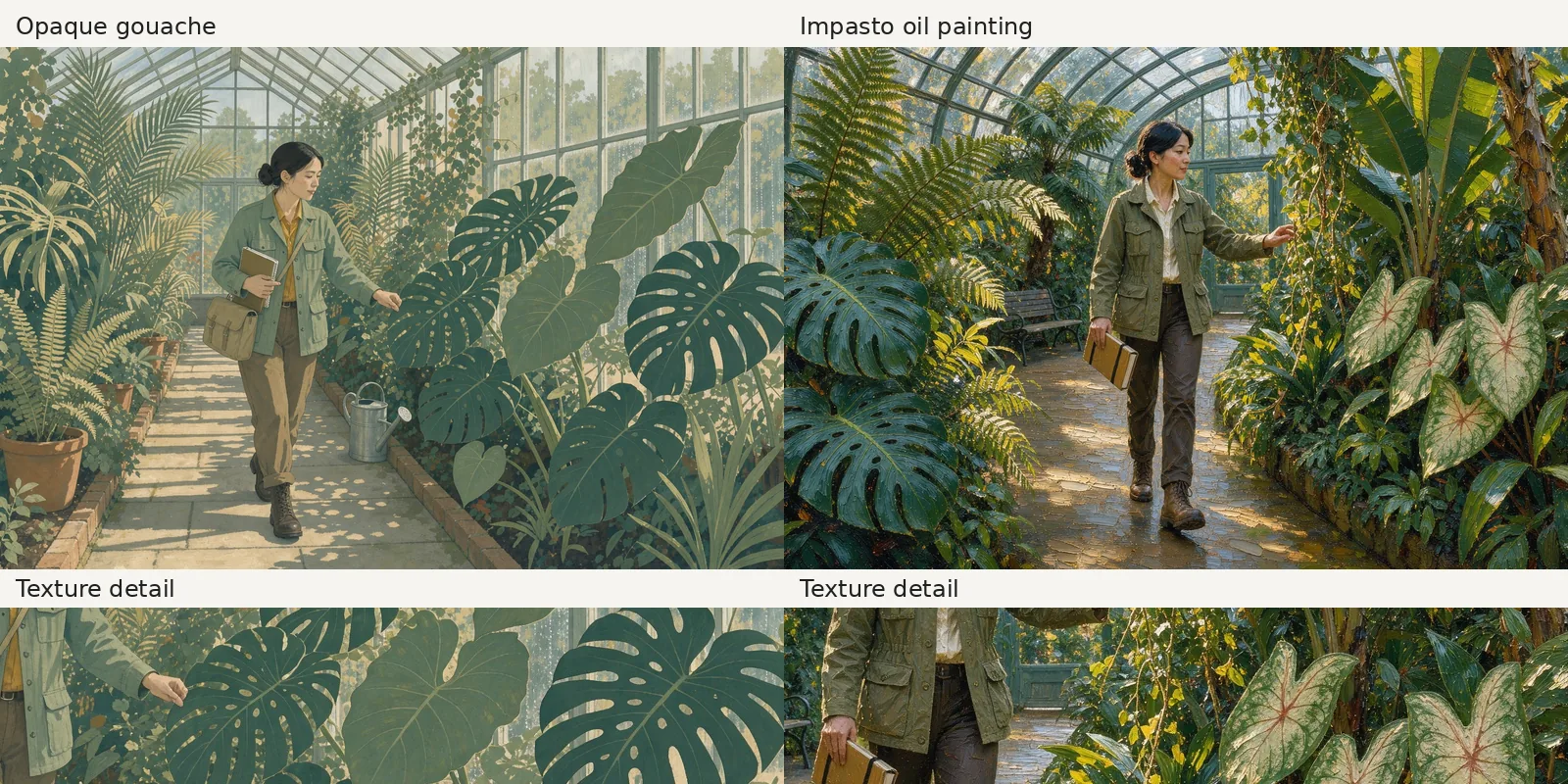
| Opaque gouache | Broad green leaves, muted ochre, matte texture | A softly colored botanical illustration |
| Impasto oil painting | Golden highlights, fine foliage detail, ridged marks on the path | A richly lit, detailed scene |
| Layered cut paper | Crisp leaf silhouettes and overlapping shapes | A graphic plant illustration |
| Two-color risograph | Green linework and orange grain on cream | A limited-palette print look |
| Stained glass | Dark boundaries and jewel-colored plant shapes | A luminous botanical panel |
| Isometric game environment | An elevated view of paths, beds, and roof structure | A greenhouse layout concept |
To match the settings, leave Add a photo empty, choose 3:2 under Size and 1K under Quality, and paste one complete prompt. The site sends the prompt as typed. The pairs below show the full outputs above detail crops.
How do gouache and oil paint change the leaves and light?
1. Opaque gouache: broad shapes and muted color
Exact prompt:
A fictional 38-year-old botanist walking through a glass conservatory, carrying a field notebook, leafy plants in the foreground, morning light, wide composition, no text. Opaque gouache illustration, matte paint, broad flat color shapes, soft dry-brush edges, muted sage green and warm ochre palette, fully clothed in a field jacket and trousers.
The large foreground leaves become broad green silhouettes with thin vein lines. Pale blocks of sunlight cross the path, and sage green and ochre connect the plants, jacket, and trousers. The botanist holds a closed notebook and reaches toward a leaf.
“Matte paint” and “broad flat color shapes” describe the finish visible here. The detail crop shows speckled texture within the flat leaves.
2. Impasto oil painting: textured light and a detailed scene
Exact prompt:
A fictional 38-year-old botanist walking through a glass conservatory, carrying a field notebook, leafy plants in the foreground, morning light, wide composition, no text. Impasto oil painting, thick palette-knife ridges, loaded brushstrokes on canvas, deep green foliage and warm golden highlights, layered atmospheric depth, fully clothed in a field jacket and trousers.
Golden highlights catch the ferns, vines, and path. The botanist carries the notebook at her side, and dense foliage frames the aisle. Compared with gouache, the leaves have more shading and surface detail.
The prompt asks for “thick palette-knife ridges” and “loaded brushstrokes.” The path shows the clearest ridged paint marks; the face and foliage remain finely detailed, with a nearly photographic appearance at the smaller display size.
Left: gouache-style result. Right: result of the impasto oil-painting prompt. Both: FLUX 3 Image, 1K, 3:2; 1248 × 832 source pixels. Full scenes above detail crops at native pixel size.
How do cut-paper shapes compare with risograph grain?
3. Layered cut paper: crisp overlapping leaves
Exact prompt:
A fictional 38-year-old botanist walking through a glass conservatory, carrying a field notebook, leafy plants in the foreground, morning light, wide composition, no text. Layered cut-paper illustration, crisp hand-cut silhouettes, overlapping colored paper planes, small cast shadows between layers, sage green and ochre cardstock, fully clothed in a field jacket and trousers.
Large leaves overlap along the foreground, with clean outlines and pale veins. The botanist walks across the aisle holding the notebook against her chest. Window shadows form a grid on the floor.
“Hand-cut silhouettes” and “overlapping colored paper planes” ask for crisp edges and stacked shapes. The leaf shapes suggest cut paper, but the requested shadows between paper layers are subtle. Choose this result for its clear silhouettes and restrained palette.
4. Two-color risograph: green linework and orange grain
Exact prompt:
A fictional 38-year-old botanist walking through a glass conservatory, carrying a field notebook, leafy plants in the foreground, morning light, wide composition, no text. Two-color risograph illustration, forest green and burnt orange inks on cream paper, visible halftone grain, slightly offset ink registration, flat graphic shapes, fully clothed in a field jacket and trousers.
Forest-green linework and burnt-orange texture cover the scene, with cream showing through the path and leaf veins. The botanist is larger in the frame than in the gouache output. Fine grain covers the foliage, clothing, and windows.
The named inks keep the palette tight, while “visible halftone grain” asks for texture within the colors. Preview the grain at its intended display size before choosing it for a small illustration.
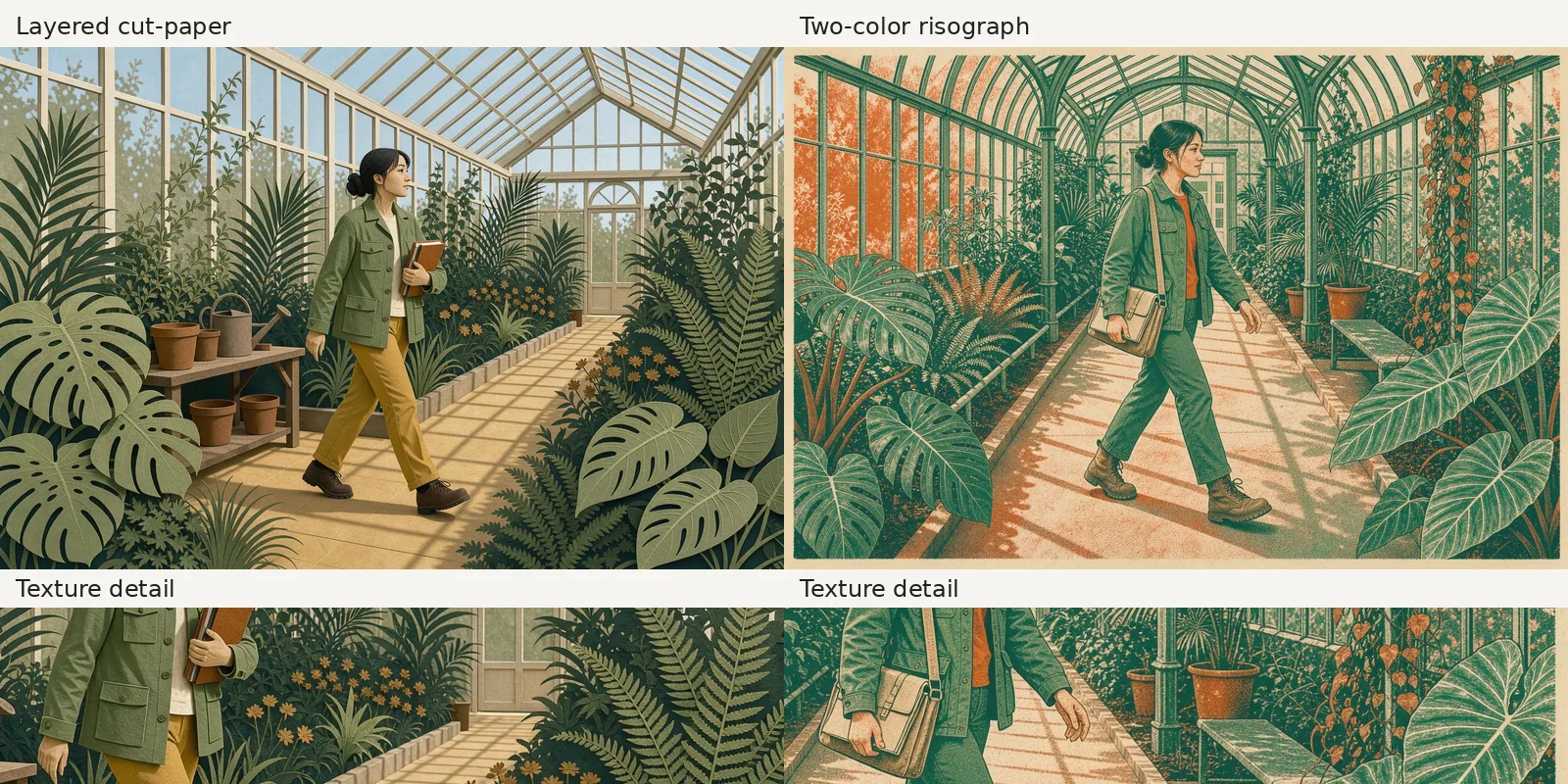
Left: result of the layered cut-paper prompt. Right: risograph-style result. Both: FLUX 3 Image, 1K, 3:2; 1248 × 832 source pixels. Full scenes above detail crops at native pixel size.
What do stained-glass outlines and a diorama view change?
5. Stained glass: dark boundaries and luminous color
Exact prompt:
A fictional 38-year-old botanist walking through a glass conservatory, carrying a field notebook, leafy plants in the foreground, morning light, wide composition, no text. Stained-glass illustration, bold dark lead outlines enclosing translucent emerald and amber glass pieces, luminous panes, stylized botanical shapes, fully clothed in a field jacket and trousers.
Dark outlines divide the plants and windows into colored pieces. Emerald leaves and amber flowers stand out against the bright glass. The botanist carries an open notebook beneath an arched roof.
“Lead outlines” describes the strong boundaries; “translucent” and “luminous panes” ask for light within the colored shapes. The effect is clearest in the foreground leaves and roof panes. The figure retains more natural shading.
6. Isometric game environment: paths and plant beds from above
Exact prompt:
A fictional 38-year-old botanist walking through a glass conservatory, carrying a field notebook, leafy plants in the foreground, morning light, wide composition, no text. Isometric game-environment art, elevated three-quarter orthographic view, a complete conservatory shown as a miniature diorama, clean modeled forms, readable walkways and plant beds, fully clothed in a field jacket and trousers.
The elevated view reveals the greenhouse roof, planting beds, paths, a pond, and a spiral staircase. The botanist becomes a small figure with an open notebook near the center. The roof reaches the top edge, so the request for a “complete conservatory” did not leave space around the entire structure.
“Elevated three-quarter” and “miniature diorama” ask for the wider view shown here. Use this direction when the arrangement of walkways and plants matters more than a close view of the person.
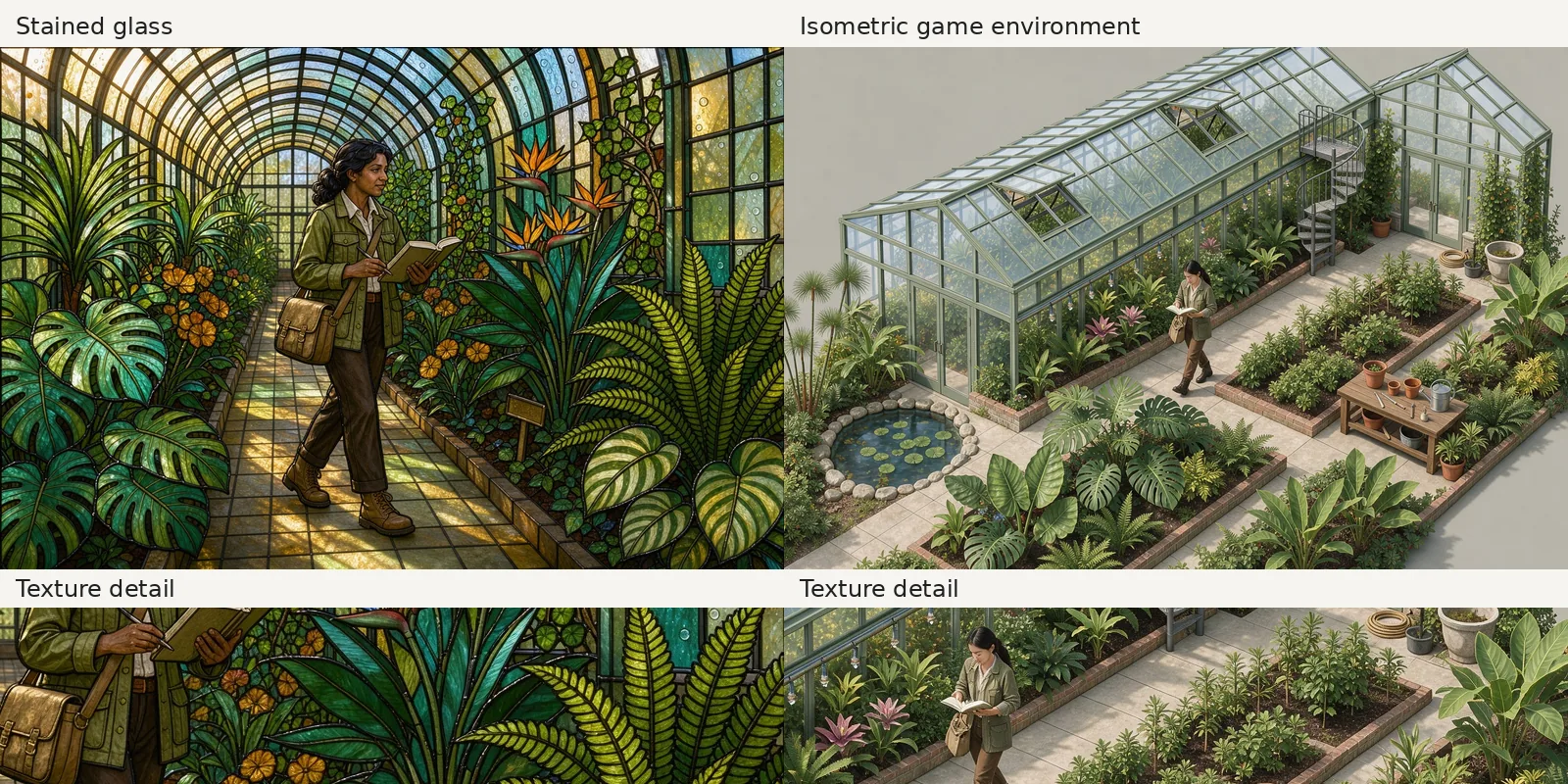
Left: stained-glass-style result. Right: result of the isometric game-environment prompt. Both: FLUX 3 Image, 1K, 3:2; 1248 × 832 source pixels. Full scenes above detail crops at native pixel size.
How can you reuse a style prompt for another scene?
Replace the subject and setting while keeping the medium, palette, and mark descriptions together. For example, the risograph treatment specifies the inks, paper color, grain, and shapes in one sentence. Keeping that sentence gives your next scene the same requested art direction.
State the action and framing explicitly. The FLUX 2 portrait prompt examples show how hand placement and headroom affect what appears in a portrait. In this gallery, “carrying a field notebook” allowed both closed and open books, and “walking” sometimes became a pause to examine a plant.
To restyle an existing image, upload it in the FLUX style-transfer tool and describe the new medium along with the subject and layout to retain. As of October 2026, the tool uses FLUX 3 Image and supports either a written style or a separate style-reference image. That editing workflow was not used for these six outputs.
For profile pictures, the six FLUX avatar styles show how different treatments look in small circular previews.
Frequently asked questions
Is FLUX AI free to use for art?
On flux-3image, the separate FLUX.2 [klein] option is free at 1K and supports editing one uploaded photo. These six examples use credit-based FLUX 3 Image. As of October 2026, the live pricing page lists 2 credits per 1K FLUX 3 Image output, so six requests cost 12 credits at that rate.
Who makes the FLUX image models?
Black Forest Labs makes the FLUX models, including FLUX 3 Image. flux-3image is an independent third-party app, unaffiliated with Black Forest Labs, where you can use the models in your browser.