
FLUX Pro AI Review: Photo Detail, Sign Text, and Model Costs
See two FLUX.2 Pro florist outputs and older FLUX1.1 Pro examples, with exact prompts, visible limitations, model differences, and October 2026 credit costs.
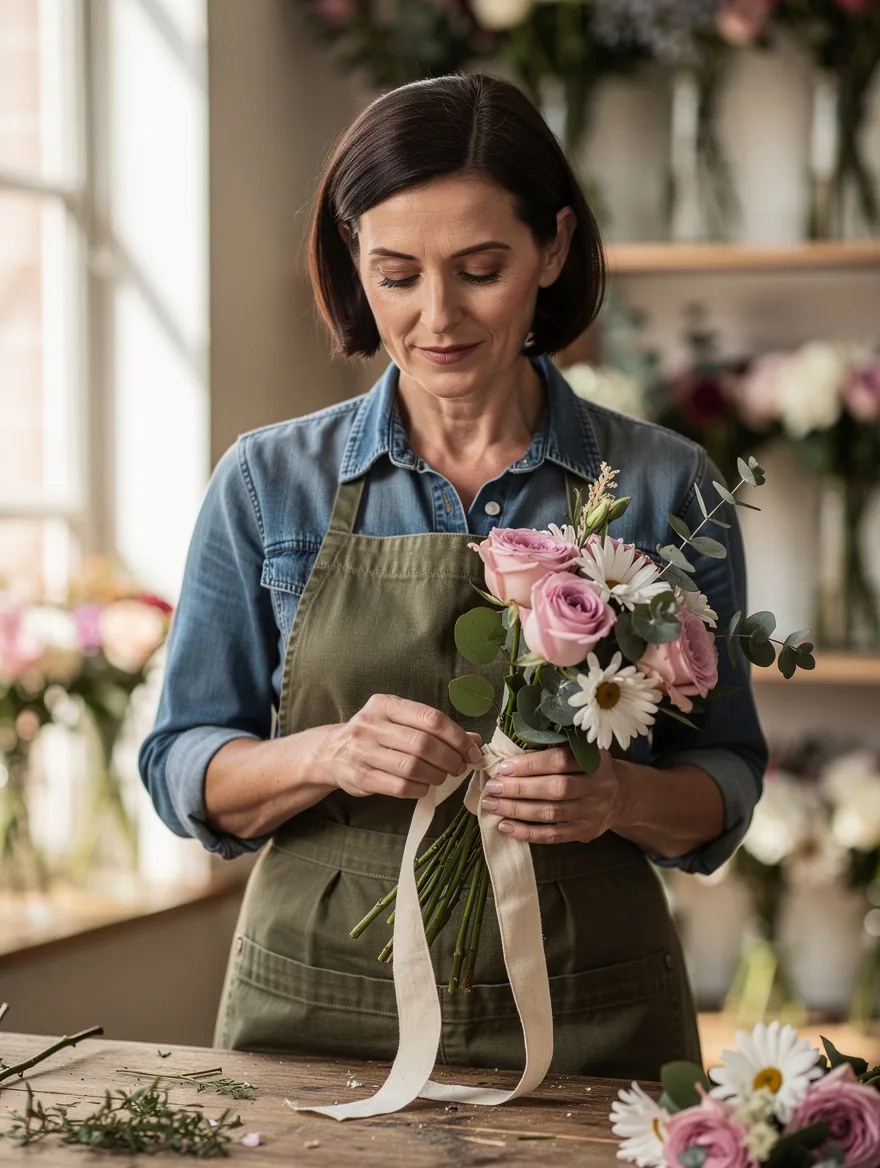
FLUX Pro AI is worth trying for shop photos and short sign lettering: the two FLUX.2 [pro] images here show distinct flower details, plausible hand placement, and a correctly spelled “FRESH FLOWERS” sign. Both miss a clothing instruction. You can try this version in the FLUX.2 Pro generator on flux-3image, an independent app that runs Black Forest Labs models. Check the version before choosing: FLUX1.1 [pro], Ultra, and FLUX.2 [pro] offer different inputs and output sizes.
Which version are you getting when you choose FLUX Pro?
As of October 2026, BFL's Pro model page lists both the earlier FLUX.1 [pro] and FLUX1.1 [pro]. Ultra is the higher-resolution FLUX1.1 mode; BFL's Ultra documentation specifies output up to four megapixels. FLUX.2 [pro] belongs to a newer family whose model overview covers generation and multi-reference editing.
These are the Pro options on flux-3image as of October 11, 2026:
| Model | Inputs on this site | Output tier | Credits per image |
|---|---|---|---|
| FLUX1.1 [pro] | Text only | 1K | 4 |
| FLUX1.1 [pro] Ultra | Text only | 2K, up to 4 MP | 5 |
| FLUX.2 [pro] | Text, or 1–8 references for edits | 1K or 2K | 3 at 1K; 10 at 2K; add 3 per reference |
The live pricing page lists these site credit prices. For example, a FLUX.2 [pro] edit at 1K with one reference costs 6 credits. The free FLUX.2 [klein] option is a separate model; it produced none of the images below.
The gallery includes two new FLUX.2 [pro] generations and two previously published FLUX1.1 [pro] examples. Their prompts differ, and the older prompts are unavailable, so the images cannot establish which version performs better. No Ultra output is included.
Does FLUX.2 Pro make the florist's hands and bouquet believable?
This was the complete text input, submitted as written with no reference image:
Photorealistic documentary-style photograph of a fictional 38-year-old woman florist with a short dark brown bob, wearing a fully buttoned denim shirt and an olive canvas apron, standing behind a wooden flower-shop workbench and tying a cotton ribbon around a bouquet of pink roses, white daisies, and eucalyptus. Both hands clearly visible around the ribbon and stems, natural fingers, entire head visible with generous headroom, waist-up framing. Soft window light from the left, glass vases of flowers softly blurred in the background, realistic skin and fabric texture, no text, no logos.
FLUX.2 [pro], 1K, 3:4 setting; saved output: 880 × 1168 pixels. Complete prompt above; no reference image.
One hand holds the stems while the other pinches the ribbon near the wrap. The fingers meet the bouquet in plausible positions. Rose petals, white daisies, and rounded eucalyptus leaves remain distinct, even where they overlap.
The bright window is on the left, as requested, and the entire head fits comfortably in the frame. Denim seams and apron stitching add detail without distracting from the hands. This is a convincing shop scene at its saved size.
The ribbon has two loose tails and no visible completed bow. Both florist images also leave the shirt open at the neck despite the “fully buttoned” instruction, so precise wardrobe requirements still need inspection.
Can FLUX.2 Pro spell a short shop sign correctly?
The second image used a separate text prompt, again with no reference:
Photorealistic documentary-style photograph of a fictional 38-year-old woman florist with a short dark brown bob, wearing a fully buttoned denim shirt and an olive canvas apron, standing in a small flower shop beside a cream rectangular sign reading exactly "FRESH FLOWERS" in large dark green uppercase letters on two lines. Pink roses, white daisies, and eucalyptus in glass vases below the sign. Her hands rest naturally on the wooden counter, both hands clearly visible, entire head visible with generous headroom, waist-up framing. Soft window light from the left, realistic skin and fabric texture. The sign is fully inside the frame, no other text, no logos.
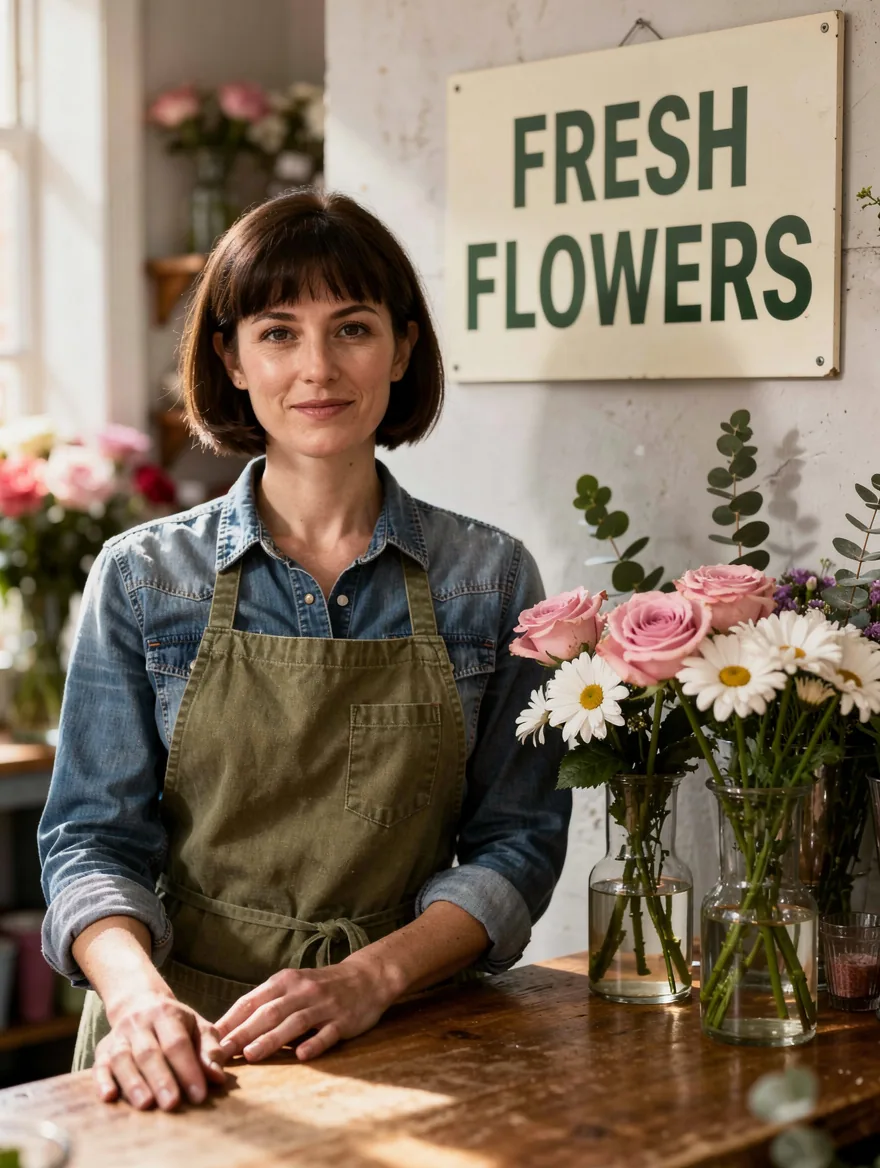
FLUX.2 [pro], 1K, 3:4 setting; saved output: 880 × 1168 pixels. Complete prompt above; no reference image.
The sign reads FRESH FLOWERS, correctly spelled on two lines. The dark green letters stand out against cream, the whole sign fits inside the frame, and no flowers cover the words. Both hands rest on the counter, with the flower vases below the sign.
That makes the result useful as a draft for a simple shop promotion. A successful two-word sign says little about a full menu or small package lettering; check every character when you change the wording.
The two prompts describe the same age, hair color, and outfit, but the outputs depict different women. The second has bangs and different facial features. To carry a particular face into another scene, start from a reference image; these text-only results do not demonstrate identity preservation.
How well does FLUX1.1 Pro handle illustration and food?

Previously published FLUX1.1 [pro] illustration. Saved file: 1024 × 768 pixels; exact original prompt unavailable.
The white lighthouse stands out against the dark rocks, while the orange sun balances it on the right. Coral reflections repeat through the navy water. The subject stays easy to recognize at a small display size, which suits a travel header or poster draft.
“Vector-style” describes the look. The supplied WebP is a raster image; editable vector paths would require redrawing or tracing it.
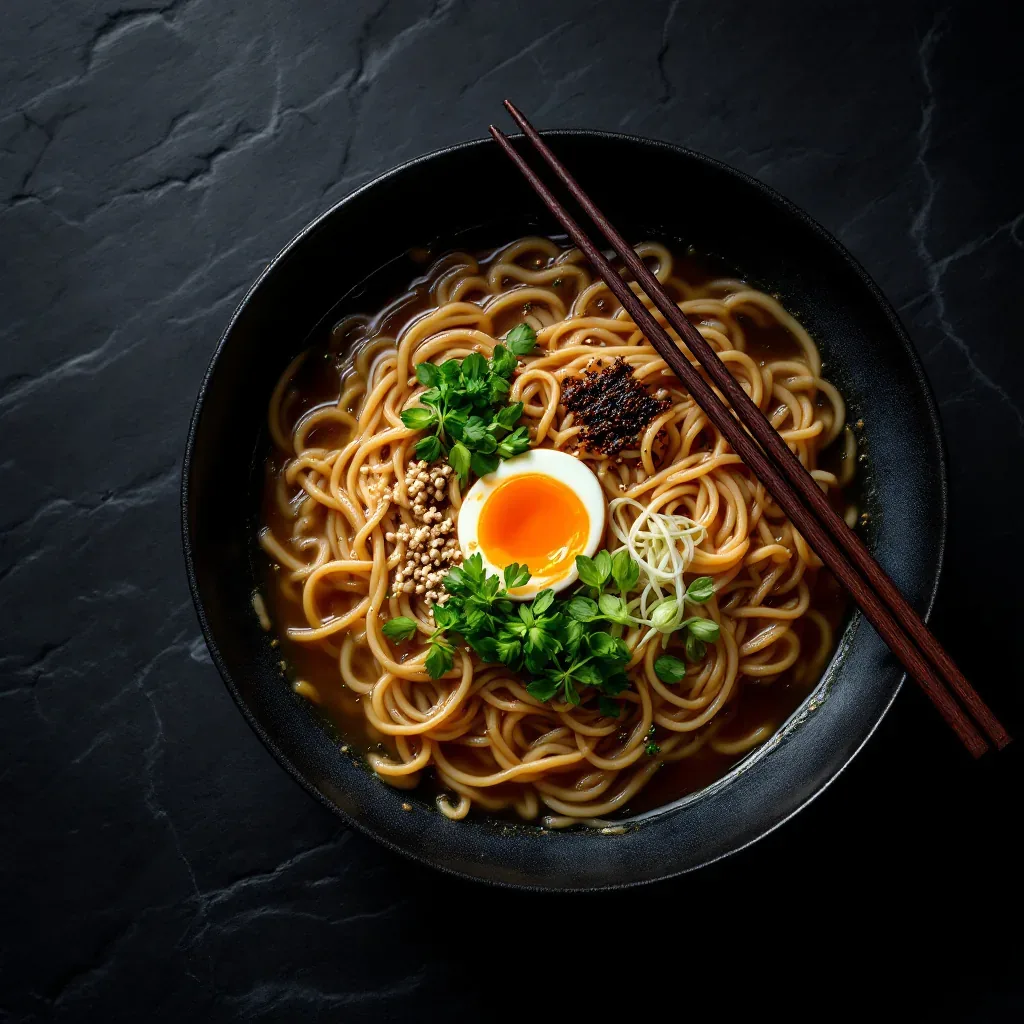
Previously published FLUX1.1 [pro] food image. Saved file: 1024 × 1024 pixels; exact original prompt unavailable.
The egg's orange yolk and green herbs draw attention to the center. Overlapping noodles and glossy broth give the food texture, and two chopsticks cross the bowl diagonally. The ingredients and utensils are recognizable at full size. For an actual restaurant menu, use a photo of the dish being sold so customers can see its real ingredients and presentation.
Is a Pro model worth using for your next image?
FLUX.2 [pro] is a reasonable starting point for scenes like these florist photos. The flower detail, hand placement, and large sign lettering work well in the displayed outputs. Exact clothing details need closer attention. Start at 1K to judge your prompt; at the checked price, a text-only attempt costs 3 credits.
The FLUX1.1 Pro and Ultra generator offers text-only generation. The older examples show a clear illustration and detailed food image; Ultra offers more pixels, but its quality on the florist prompts remains untested here. Choose FLUX.2 [pro] when you need reference-based editing, which neither FLUX1.1 option offers on this site.
For more framing and lighting ideas, see the FLUX.2 portrait prompt guide. The FLUX 3 versus FLUX 2 gallery shows matching prompts across model pairs if you want a comparison with shared inputs.